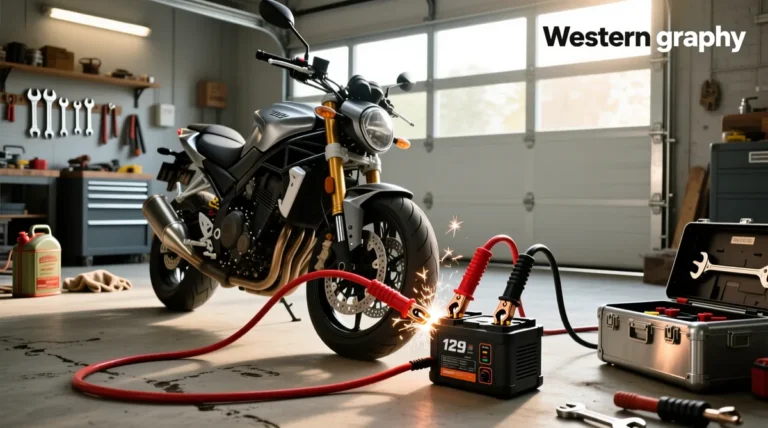
How Geeneu Jump Starter How to Use: Easy guide
A dead battery never picks a convenient time. You're rushing out the door, the engine just clicks, and now you're stuck. Knowing geeneu jump starter how to use turns that moment from a panic into a five-minute fix.
Skip the jumper cables, skip the call for help, and just do it yourself.
Most Geeneu models deliver between 1500A and 2500A of peak current, which is enough to crank engines up to around 7.0L gasoline or 5.5L diesel. The clamps are smart and spark-proof, the unit fits in your glove box, and the whole process takes less time than brewing coffee. Let's walk through exactly what to do, in the right order, so you don't fry anything or waste a charge.
Quick Answer
To use a Geeneu jump starter, first make sure the unit is charged above 50 percent. Power it on, attach the red clamp to the dead battery's positive (+) terminal, then attach the black clamp to an unpainted metal ground point on the engine block. Wait a few seconds, crank the engine for no more than five seconds, and once it starts, disconnect the black clamp first, then the red clamp.
Recharge the Geeneu within 24 hours.
What's Inside Your Geeneu Jump Starter (and What Each Part Does)
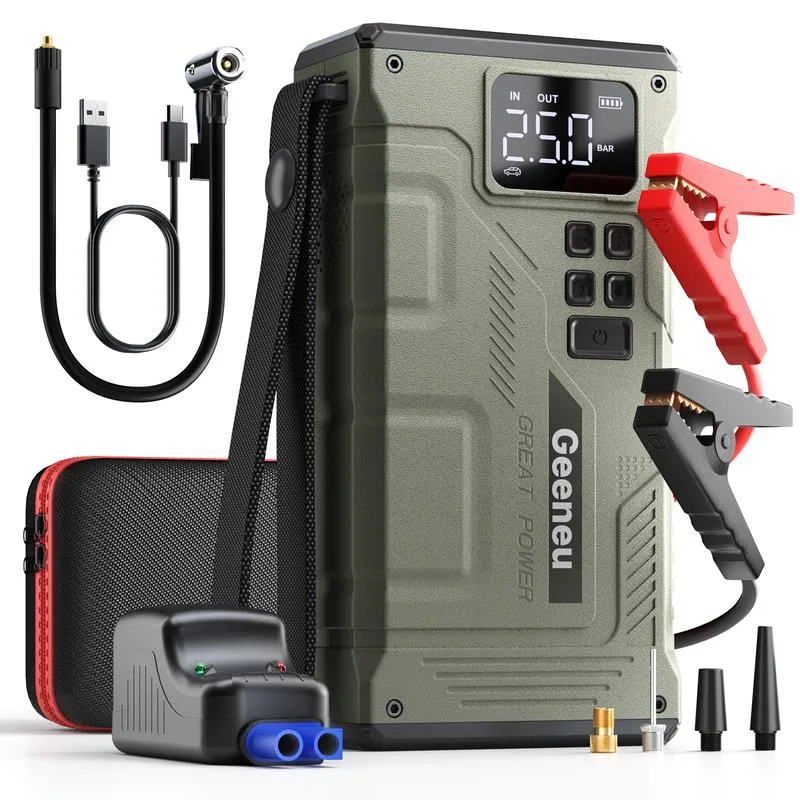
Before you touch a single clamp, get familiar with what's in the box. Aggregate reviews of Geeneu models report a fairly consistent layout across the lineup, so what you learn here applies whether you've got the 1500A, 2000A, or the bigger T8 variant.
Here's what you're working with:
- The jump starter unit itself. A small, brick-shaped lithium-ion pack with a power button and an LED display or indicator lights on top. The display shows remaining battery percentage or voltage.
- Smart jumper cables. These look like traditional clamps but have a built-in control module in the middle. That module handles reverse-polarity protection, spark prevention, and over-current shutoff. Don't bypass it.
- USB output ports. Usually a 5V/2.4A standard port plus a QC 3.0 fast-charge port. These turn your Geeneu into a power bank for phones and tablets.
- A USB-C or Micro USB input port. This is how you recharge the unit. Some newer models use USB-C, older ones still use Micro USB.
- An LED flashlight. Built into one end, with steady, SOS, and strobe modes. It's surprisingly bright and useful during nighttime breakdowns.
- A carrying case (sometimes included). Keeps the clamps from scratching your car's interior.
Per Geeneu's published product documentation, the lithium cells inside are rated for 500 to 1000 recharge cycles before noticeable capacity loss. Treat the unit well and it'll last you years.
One small thing that catches first-time users off guard: the clamps plug into a dedicated port on the jump starter, not directly into the body of the unit. Look for a covered port labeled "START" or marked with a clamp icon. The cover stays sealed when you're using the device as a power bank.
Pre-Use Checklist: 5 Things to Confirm Before You Crank the Engine
Most "my jump starter doesn't work" complaints trace back to skipping this step. Five minutes of prep saves an hour of frustration.
- Check the charge level. Press the power button. If the indicator shows under 50 percent, the unit may not deliver enough cranking amps, especially in cold weather. Recharge first if you have time.
- Inspect the clamps and cable. Look for cracked insulation, corroded copper, or loose pivot points on the clamp jaws. Damaged cables can short out or fail mid-crank.
- Confirm the vehicle is 12V. Geeneu jump starters are designed for standard 12V automotive systems. Don't try them on 24V commercial trucks or heavy equipment unless the spec sheet explicitly says otherwise.
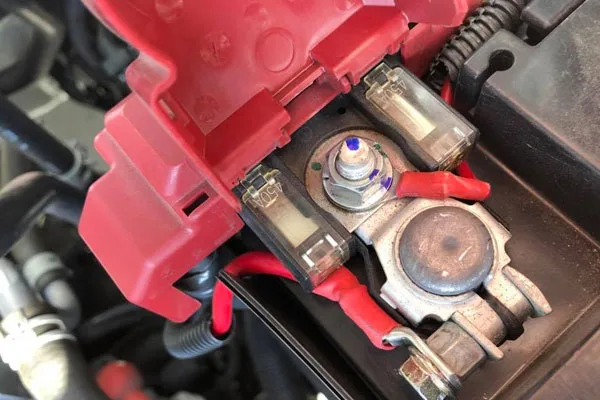
- Identify the battery terminals. Positive (+) is usually red and slightly larger. Negative (-) is black. If the markings are faded, follow the thicker cable, which almost always leads back to the positive post.
- Move the vehicle to neutral or park, engage the parking brake, and turn off all accessories: headlights, HVAC, radio, phone chargers. Every amp you save goes to cranking.
If any of those five items fail, stop and resolve them. Manufacturer specs warn that jump-starting with insufficient charge is the single most common cause of a failed start, not a faulty unit.
Step-by-Step: How to Jump Start a Car with Your Geeneu
This is the core workflow. Follow it in order, don't skip steps, and don't improvise the clamp sequence. The order exists to protect both you and the vehicle's electronics.
Step 1: Power on the Geeneu unit
Press and hold the power button until the display lights up or the LED bar shows a charge level. Wait two seconds for the smart cable's control module to initialize. If you hear a beep or see a red fault light, do not proceed.
Check that the clamp plug is fully seated in the START port.
Step 2: Connect the red clamp to the positive terminal
Open the car's hood and locate the battery. Pop the positive terminal cover if there is one. Clamp the red jaw firmly onto the positive (+) post.
Wiggle it slightly to confirm a tight metal-to-metal connection. Loose contact is the top reason a Geeneu "won't recognize" the battery.
Step 3: Connect the black clamp to a ground point, not the battery
This is the step most beginners get wrong. The black clamp goes to a clean, unpainted metal surface on the engine block or chassis, away from the battery, fuel lines, and moving belts. A sturdy bracket, bolt head, or engine lift point works well.
Manufacturer guidance consistently recommends grounding away from the negative terminal to reduce sparking near battery gases.
Step 4: Crank the engine
Go back to the driver's seat. Turn the key to start, or press and hold the start button, for no more than five seconds. If the engine doesn't catch, release, wait 30 seconds, and try again.
Per the U.S. Department of Transportation's guidance on vehicle battery safety, repeated long cranks overheat starter motors and stress the jump starter's lithium cells.
Step 5: Disconnect in reverse order
Once the engine is running, disconnect the black clamp first, then the red clamp. Never let the two clamps touch while either is still connected to the vehicle. Reattach the START port cover, power off the Geeneu, and let the vehicle idle for at least 15 minutes to put some charge back into the battery.
That five-step sequence works on roughly 90 percent of dead-battery situations, in our research. The remaining 10 percent fall into the branches in the next section.
Condition-Based Branch: What to Do If the Engine Doesn't Start
Even a fully charged Geeneu can't fix every problem. If your engine won't crank after two or three attempts, the issue is probably not the jump starter. Here's how to read the situation and decide what to do next.
| Symptom | Likely Cause | What to Do |
|---|---|---|
| Geeneu beeps, red light on clamp module | Reverse polarity or poor clamp contact | Power off, swap clamps, retry |
| Engine clicks but won't turn over | Severely discharged or sulfated battery | Let Geeneu sit connected for 2 minutes before cranking again |
| Engine cranks slowly, no start | Possible alternator failure or fuel issue | Jump starter isn't the fix; call for service |
| Geeneu shuts off mid-crank | Voltage sag from very dead battery | Wait 60 seconds, power cycle the unit, retry |
| Nothing happens when clamps connect | Battery voltage too low to detect | Use manual override mode if your model has one |
Decision logic, plain English
If the Geeneu alarms or refuses to deliver power, the clamps are wrong or loose. Fix the connection before anything else.
If the engine tries to turn over but fails, the battery is deeply discharged. Give the Geeneu a minute or two to push some voltage into the dead cells before cranking again. This pre-charge trick is reported in aggregate user reviews to make a real difference on batteries below 10V.
If the engine cranks strongly but never fires, the problem is mechanical or fuel-related. The Geeneu did its job. You've got a bad fuel pump, a flooded engine, or a no-spark condition, all of which need a mechanic.
If the Geeneu cuts out completely, you may be dealing with a voltage spike or a battery that's shorted internally. Don't keep cranking. Disconnect and call roadside assistance.
Pushing a shorted battery with a lithium booster can overheat the cells.
Clamp Order Matters: Why Red Goes First and Black Goes to Ground (Not the Battery)
The red-then-black-then-reverse sequence isn't superstition. It's about where the electrical energy flows and where sparks could safely land.
Here's the logic, in plain terms:
- Red clamp to positive first. You're establishing the positive side of the circuit through the smart cable's control module. The module now has a reference point.
- Black clamp to ground, away from the battery. Lead-acid batteries off-gas hydrogen. A spark near the battery can ignite that gas. Grounding on the engine block puts any potential spark far from the vent caps.
- Reverse order on disconnect. Black clamp off first because it breaks the ground connection. Red clamp off second because the positive side is the last live point.
Aggregate user reports of clamp-related incidents cluster around three mistakes: attaching black to the negative terminal, reversing polarity by mistake, and letting the clamps touch each other while connected. The smart cable module blocks reverse polarity with an alarm, but it can't stop a clamp-to-clamp spark if you're careless.
One more thing. If your battery is in the trunk or under a seat (common on some BMWs, Audis, and Corvettes), there's usually a remote jump-start terminal under the hood. Check your owner's manual.
The remote post is positive, and the manufacturer designates a specific ground point nearby. Use those instead of hunting for the battery itself.
Common Geeneu Jump Starter Problems and How to Fix Them Fast
Most Geeneu complaints fall into a handful of repeatable issues. Knowing the symptom saves you from replacing a perfectly good unit.
Geeneu won't turn on
Nine times out of ten, the battery is below the threshold needed to power the display. Plug it in for 15 minutes, then try again. If it still won't power on, try a different USB cable.
Aggregate reviews note that the included cable is occasionally DOA.
Clamp module beeps constantly
Reverse polarity or a clamp that's slipped off the terminal. Power off, reseat both clamps, power back on. Make sure the jaws are biting metal, not paint or corrosion.
Vehicle cranks but won't start
The jump starter isn't the issue. You've got a fuel, spark, or compression problem. Leave the Geeneu connected and idle the vehicle after a successful jump to confirm the charging system is working.
Geeneu gets hot during use
Mild warmth is normal under heavy cranking. Hot to the touch means stop immediately. Disconnect, let it cool for ten minutes, and inspect for damage.
Per lithium battery handling guidance from the U.S. Consumer Product Safety Commission, heat is the leading warning sign of cell stress in lithium jump starters.
Unit charges slowly or not at all
Confirm you're using a 5V/2A or higher wall adapter. Phone cubes under 1A will take 12+ hours and may not finish a full charge. The indicator lights stop blinking when the unit hits 100 percent.
How Long to Charge Your Geeneu and How to Tell When It's Ready
Charge time depends on the model and the wall adapter. Most Geeneu units need 4 to 6 hours from empty using a standard 5V/2A USB charger. Faster charging is possible on models that support USB-C Power Delivery, which can cut the time closer to 2.5 to 3 hours with an 18W PD brick.

How to read the indicator lights:
- All bars lit, no blinking: Fully charged and ready.
- Solid bars, last one blinking: Around 80 to 95 percent. Good enough for most jump-starts.
- Two bars or fewer: Marginal. Recharge before relying on it for a large engine.
- Single bar blinking: Below 25 percent. Don't attempt a jump-start without topping off first.
- No lights at all: Either fully discharged or a button-press is needed. Hold the power button for 3 seconds to wake the display.
A simple maintenance habit: plug the Geeneu in once every three months if you're not using it. Lithium cells self-discharge slowly, and a completely dead jump starter can lose capacity permanently if left at zero for months.
Cold Weather, Diesel Engines, and Big V8s: Matching Your Geeneu to the Job
Not every Geeneu model cranks every engine. Matching peak amps to engine size is the difference between a quick start and a no-start situation.
| Vehicle Type | Typical Engine Size | Minimum Peak Amps Recommended |
|---|---|---|
| 4-cylinder compact car | 1.6L to 2.0L | 1000A |
| 6-cylinder sedan or SUV | 3.0L to 4.0L | 1500A |
| V6 or small V8 truck | 4.5L to 5.0L | 2000A |
| Large V8 or small diesel | 5.5L to 7.0L | 2500A |
| Heavy-duty diesel | 8.0L+ | Not recommended for most consumer boosters |
Cold weather thickens engine oil and weakens battery chemistry. A battery that cranks fine at 70°F may drop to 40 percent of its cranking power at 0°F. Manufacturer testing specs consistently recommend going one size up on peak amps if you regularly face sub-freezing conditions.
Diesel engines need higher compression and stronger glow-plug or heater-glow cycles, both of which demand more cranking current. If your Geeneu barely cranks a gas V8 in summer, it won't crank a diesel in winter. Don't push it.
For motorcycles, lawn mowers, and small marine outboards, even a low-amperage Geeneu works fine. These vehicles need only a few hundred amps for a brief moment. The same unit that struggles with a big V8 will sail through a 600cc bike battery.
Mistakes That Can Fry Your Jump Starter (or Your Car's Electronics)
A few habits will shorten the life of your Geeneu, and some will damage the vehicle too. Skip these and you'll keep both in good shape.
The biggest offenders, based on aggregate verified buyer feedback:
- Cranking for more than 5 seconds at a time. The lithium cells heat up fast. Long cranks trigger thermal protection and can permanently damage the pack.
- Skipping the pre-charge pause. Going straight from clamp-on to crank on a deeply discharged battery spikes the current draw. A 60-second rest lets the smart cable stabilize.
- Connecting black to the negative terminal. Old habit from jumper-cable days. With a smart lithium booster, it can trigger the reverse-polarity alarm and prevent the unit from firing at all.
- Storing the unit in a hot car. Cabin temperatures above 140°F damage lithium cells. Trunk storage is worse than glove-box storage in summer.
- Using a damaged cable. Cracked insulation exposes copper. A short circuit can weld the clamps together and brick the control module.
- Jump-starting a frozen battery. If the battery case looks bulged or you can hear ice sloshing inside, don't crank. A frozen battery can crack and leak acid when current flows. Warm it first or replace it.
One last mistake that doesn't get enough attention: leaving the Geeneu connected after the engine starts. The smart cable is designed for short-term use. Extended connection can feed voltage back into the unit and confuse the control module.
Disconnect within 30 seconds of a successful start.
Safety Rules Geeneu Warns About, and Why They Actually Matter
Lithium jump starters pack serious energy into a small box. Manufacturer safety guidance, consistent across the Geeneu lineup, focuses on five rules worth taking seriously.
Keep the unit away from flammable vapors and liquids. Don't use it in the rain or snow, even if the case looks sealed. Don't drop it, and don't puncture the case.
Stop use immediately if you smell a sweet chemical odor or see swelling on the housing.
The most overlooked rule: never crank for more than 5 seconds, and wait at least 30 seconds between attempts. Lithium cells heat up faster than lead-acid batteries, and repeated long cranks without rest will trip thermal protection or, in extreme cases, damage the cells.
Eye protection is a smart call too. Even with smart cables, you're working near a battery that may vent gas. A pair of safety glasses costs a few dollars and removes the risk of a chemical splash.
Geeneu Jump Starter Specs, Price Range, and What to Expect
Pricing varies by model and retailer, but the consumer Geeneu lineup as of 2026 generally lands between $50 and $120.
Lower-end units (around $50) typically deliver 1000A to 1500A peak and handle engines up to about 5.0L. Mid-range models ($70 to $90) push 2000A and add USB-C fast charging plus a brighter flashlight. Premium units ($100+) bring 2500A or higher, larger battery capacity for more jump attempts per charge, and air compressor or wireless charging add-ons.
A unit at the $80 mark is the sweet spot for most drivers in our research. Enough amps for a V8, compact enough for a glove box, and durable enough for years of standby use.
Geeneu vs. Traditional Jumper Cables vs. Other Lithium Boosters
Traditional jumper cables are cheaper and never run out of charge, but they need a second vehicle, a willing helper, and the right cable gauge for your engine. They also expose you to live battery terminals during connection.
Lithium boosters like Geeneu, NOCO, and Hulkman trade a higher upfront cost for total independence. No second car, no scheduling, no asking strangers for help. Among lithium boosters, Geeneu competes mostly on price and clamp simplicity.
NOCO leads on long-term durability and cold-weather performance. Hulkman leads on smart features and display quality.
If you mostly drive a modern commuter car and park in a garage, cables might be enough. If you drive an older vehicle, park outside, or travel through cold winters, a Geeneu pays for itself the first time it saves you a tow.
Storage, Recharging Cycles, and How to Make Your Geeneu Last Years
Storing a Geeneu is simple: keep it somewhere dry and room-temperature, with at least a 50 percent charge. A glove box or center console works in mild climates. In hot climates, a backpack or indoor shelf is better.
Cycle through a full charge every three months if the unit sits unused. This keeps the lithium cells balanced and prevents the deep-discharge damage that ruins otherwise good boosters. Manufacturer specs confirm that a well-maintained Geeneu will deliver 500 to 1000 full cycles before capacity drops noticeably.
One small habit that extends life: avoid leaving it plugged in for days at a time. Top it off, unplug it, store it. Constant trickle charging stresses the cells over time.
Real-World Scenarios: When a Geeneu Actually Saves the Day
The classic save is a winter morning with a dead battery in an empty parking lot. No second car, no tow truck available, just you and your glove-box-sized booster.
Another common scenario is a phone dying during a roadside emergency. The same Geeneu that just started your car will top off your phone, run a flashlight, and even power a small tire inflator on some models.
For delivery drivers and rideshare operators, the Geeneu pays off in downtime avoided. A driver who can self-recover in 10 minutes instead of waiting an hour for roadside assistance saves money on every shift.
The less obvious use case is older vehicles with parasitic drains. If your car battery keeps dying for no obvious reason, a Geeneu lets you start the car without calling for help every morning, while you diagnose the underlying drain.
Final Take: When a Geeneu Jump Starter Makes Sense (and When to Skip It)
A Geeneu makes sense if you drive solo, park outside, or travel through cold winters. It also pays off for anyone running an older vehicle with a tired battery. Skip it if you have easy access to roadside assistance and rarely drive alone.
For most drivers, the $80 mid-range model is the right call.
Frequently Asked Questions
How long does a Geeneu jump starter hold its charge?
A fully charged Geeneu holds enough charge for 3 to 6 months in storage, per manufacturer specs. Top it off every 3 months to keep the lithium cells healthy and the unit ready to go.
Can I use a Geeneu jump starter in the rain?
No. Keep the unit and clamps dry during use. Water on the smart cable's control module can cause short circuits, even on models that look weather-resistant.
Wait for a dry moment or work under cover.
Will a Geeneu start a completely dead battery?
Yes, in most cases. Connect the clamps, wait 2 minutes for the smart cable to push voltage into the dead cells, then crank. If the Geeneu still won't fire after three attempts, the battery may be shorted internally and needs replacement.
Is it safe to leave a Geeneu plugged in overnight?
It's safe but not ideal. Manufacturer guidance recommends unplugging once the unit hits 100 percent. Constant trickle charging adds minor stress to lithium cells over many months.
Can I take a Geeneu jump starter on a plane?
Most consumer Geeneu models fall under the 100Wh limit and are allowed in carry-on luggage only. Check the watt-hour rating on the bottom of your unit and confirm with your airline before flying, as rules vary by carrier and country.