How does a dash cam work: Easy Guide
If you've ever cruised past a fender-bender and thought, "I'd love proof if that ever happened to me," you're exactly the person who ends up asking how does a dash cam work. The short version: a dash cam is a purpose-built, always-on camera that records the road through your windshield, writes short video clips to a memory card on a loop, and locks the important files when its motion sensor detects an impact. The longer version is what makes the difference between a camera that catches the crash and a camera that overwrites the only clip that matters.
A basic front unit captures roughly 4 to 5 hours of 1080p footage on a 32GB card before looping, and a lot of that engineering lives on a board about the size of your thumb. Per NHTSA's vehicle electronics guidance, the same power-and-data principles that govern factory in-car cameras also apply to aftermarket units, so the way a dash cam wakes, records, and saves is closer to your car's other modules than to a regular camcorder. Let's pull the camera apart and see what's actually happening when you press the brake.
Quick Answer
A dash cam works by recording video through a wide-angle lens onto a microSD card in short looping segments. A G-sensor detects impacts and locks those clips so loop recording won't overwrite them. A GPS chip stamps speed and location onto the video.
Power comes from the car's 12V outlet or a hardwired fuse tap, and most cameras keep recording while parked using motion and impact detection.
What's Actually Inside a Dash Cam
Pop the front cover off a modern dash cam and you'll find the same six building blocks, whether you paid $40 or $400.
- Lens and image sensor. The lens focuses light onto a CMOS sensor, typically a Sony STARVIS or OmniVision chip in current models (as of 2026). Apertures around f/1.6 to f/2.0 let in enough light for night driving.
- Image processor. This is the "brain" that compresses raw video into H.264 or H.265 files. It also handles HDR and WDR processing for tricky lighting.
- G-sensor. A 3-axis accelerometer that watches for sudden braking, swerves, or impacts. When a threshold is crossed, it flags that clip as protected.
- GPS module. Receives satellite signals and stamps the video with speed, coordinates, and a synced time.
- Supercapacitor or lithium battery. Capacitors handle heat better and store just enough energy to safely save the last file when power cuts out.
- microSD slot. Where everything gets written. Most cameras support up to 256GB or 512GB endurance cards.
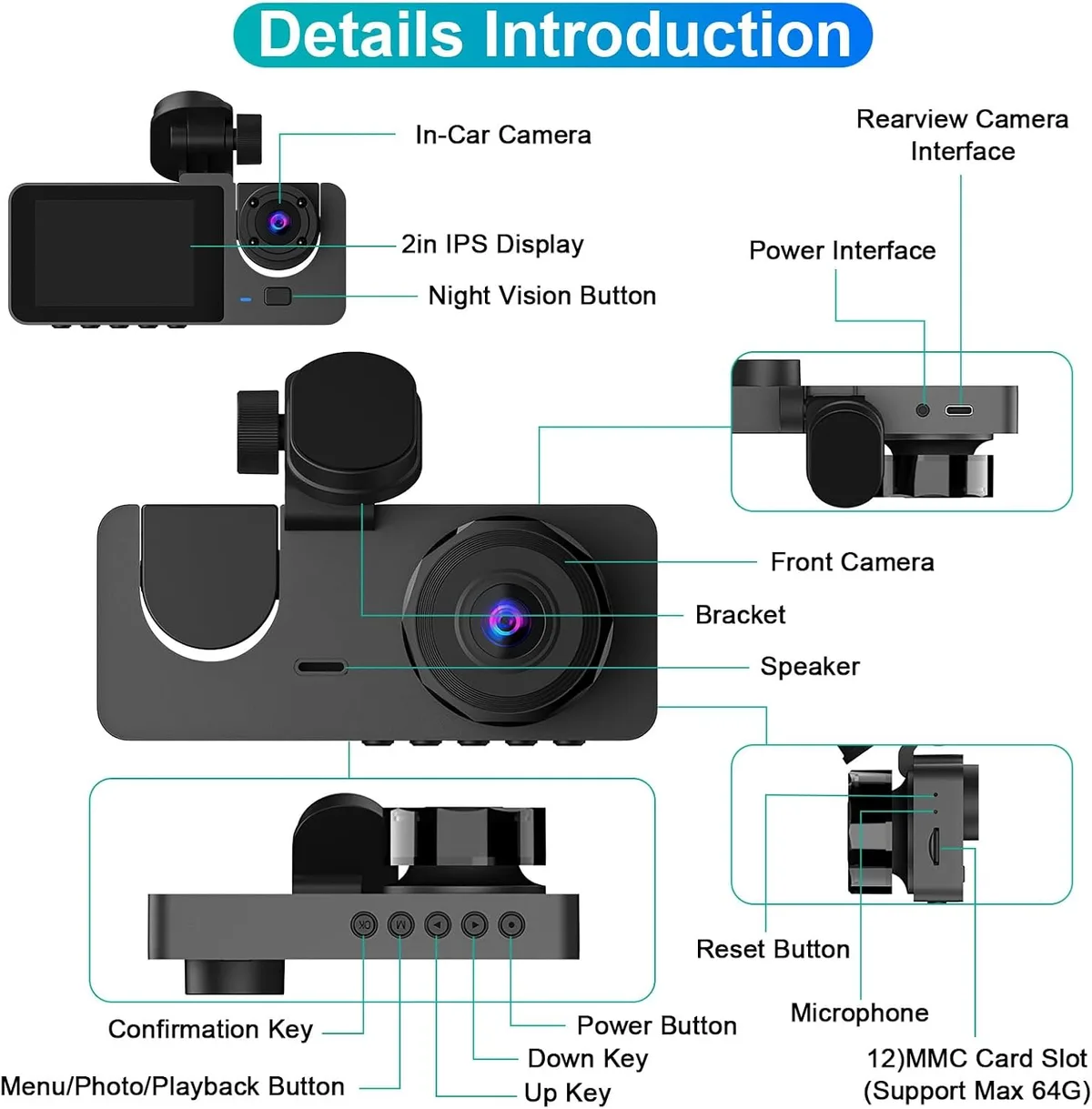
Where these parts live and what they do
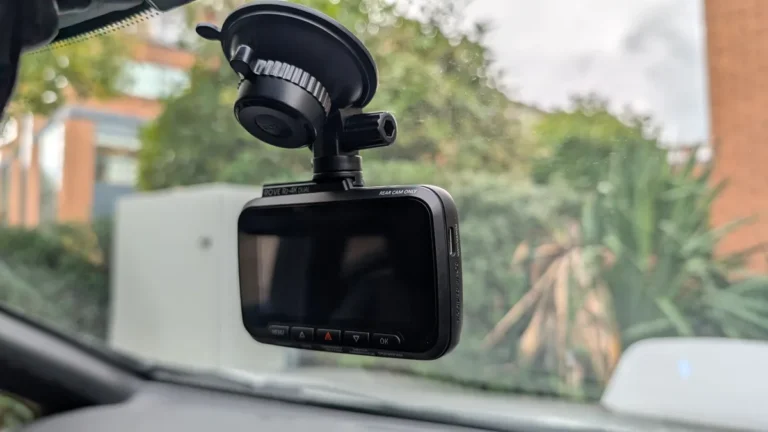
The lens and sensor sit up front, facing out through the glass. Behind them is the processor board, which runs hot enough that manufacturers often glue a small thermal pad to the housing. The GPS antenna is usually tucked along the top edge for sky visibility, while the G-sensor is mounted on the main board so it's aligned with the car's chassis.
The power input is on the side, and the SD card slot sits on the opposite edge so you can pop the card without unmounting the camera.
Why the design choices matter
That supercap isn't there to power the camera for hours. It's there to give the processor about 5 to 10 seconds of runtime after a crash so the file can close cleanly without corruption. The G-sensor being on the main board is why you can set it to "high" sensitivity without false triggers from road vibration.
Every component is positioned to survive heat, vibration, and sudden power loss, the three things that kill consumer-grade cameras in cars.
How a Dash Cam Starts and Stops Recording Automatically
There's no on/off button in daily use. The camera watches the 12V line coming from its power source, and when voltage rises above roughly 13.4V (engine running) it boots up and starts writing video. When voltage drops below about 12.8V (engine off, alternator stopped), the camera treats it as a shutdown signal, finishes writing, and powers down.
What happens when you turn the key
Here's the typical startup sequence in a hardwired unit:
- Ignition on. Voltage spikes above the threshold. The processor boots in 2 to 5 seconds.
- GPS lock. The camera finds satellites and starts logging position. Cold lock can take 30 to 60 seconds. Warm lock is near-instant.
- Recording starts. A new file opens and writes continuously until it hits the segment length, usually 1, 3, or 5 minutes.
- G-sensor and GPS stay armed. Even while recording, the sensor watches for impacts and the GPS keeps stamping data.
What happens when you shut the car off
The voltage drops, the camera queues a "finalize" command, the supercap kicks in, the file closes cleanly, and the unit powers down. The whole shutdown usually takes 3 to 7 seconds, which is why most cameras save a "shutdown" event in their logs.
Loop Recording Explained (and Why Files Don't Run Out)
Loop recording is the trick that lets a tiny memory card store weeks of driving. Instead of recording one giant file, the camera writes short clips back-to-back. When the card fills up, the camera deletes the oldest unlocked file and writes the new one in its place.
You never run out of space. You just lose old footage unless something marked it as protected.
How segments are managed
Most cameras let you pick 1-, 3-, or 5-minute segments. Shorter segments are easier to review and share, but they create more file-header overhead, which eats a little bit of storage. Longer segments are more space-efficient but harder to scrub through. 3 minutes is the industry sweet spot for daily driving.
How files get marked protected
Three things flag a clip so the loop won't touch it:
- G-sensor event. A hard brake, swerve, or impact locks the current segment plus a few seconds before and after.
- Manual save button. Press the emergency button on the camera, and it protects the current clip.
- Parking mode event. Motion or impact while parked triggers the same lock.
What about bitrate?
Higher resolution means higher bitrate. A 1080p/30fps clip typically runs 12 to 20 Mbps. A 4K/30fps clip can run 50 to 60 Mbps.
That's why a 256GB card might give you 18 hours at 1080p but only 6 hours at 4K. Bitrate also drives license-plate clarity, so if you need plates readable, don't just chase resolution. Look at bitrate and shutter speed too.
How the G-Sensor Detects Collisions and Locks Footage
The G-sensor is the part that turns a dash cam from a video recorder into an evidence recorder. It's a tiny MEMS accelerometer soldered to the main board, and it measures acceleration on three axes (forward/back, left/right, up/down) roughly 100 times per second.
What it actually measures
It doesn't measure "speed." It measures change in speed. A gentle merge onto the highway barely moves the needle. A 30 mph front impact spikes the forward axis to several g's in under a second.
The processor compares that spike against the threshold you've set and decides whether to lock the file.
Sensitivity settings and why they matter
Most cameras offer Low, Medium, and High sensitivity, sometimes with a numerical scale (1.0g, 1.5g, 2.0g, etc.).
| Setting | Typical Threshold | Best For |
|---|---|---|
| Low | ~2.0g | Smooth highway driving, pothole-heavy roads |
| Medium | ~1.5g | Mixed city and suburban use |
| High | ~1.0g | Parking mode, harsh brake events |
If you set it too sensitive, every speed bump locks a file, and you'll fill the card with pothole clips. Too low, and a real impact might not cross the threshold. Medium is a reasonable default for most drivers.
What gets locked during an event
When the sensor trips, the camera protects the current segment and the few seconds that came before. Some cameras also pull the next 10 to 30 seconds of footage forward into the protected folder. That pre-roll window is why dash cam footage often shows the crash plus a few seconds of "what was about to happen," which is exactly what insurers and lawyers want.
How Parking Mode Works When You're Not in the Drive
Parking mode is what separates a camera that only helps on the road from one that protects your car 24/7. When the engine cuts, the camera doesn't fully power down. It switches into a low-power standby and waits for two kinds of triggers: motion in front of the lens, or a sudden impact detected by the G-sensor.
The two main parking-mode styles
- Motion + impact (buffered). The camera stays mostly asleep, recording at a low frame rate or only saving a few seconds before and after an event. This is the most common style and the easiest on your battery.
- Time-lapse. The camera records continuously at a low frame rate (1 to 4 fps), compressing hours of parking into minutes of footage. Great for catching hit-and-runs that happen slowly, but it fills cards faster.
What triggers a parking event
A motion event uses pixel-change detection in the image processor. If enough pixels shift between frames, the camera assumes something moved and saves the clip. An impact event uses the same G-sensor logic as driving mode, just at a lower threshold since parked impacts are usually slower.
Power draw and battery protection
Hardwired cameras draw between 100 mA and 300 mA in parking mode, depending on resolution and frame rate. Run that math over a 12-hour day at a grocery store and you're looking at 1.2 to 3.6 Ah pulled from a typical 50 Ah car battery. Most hardwire kits include a low-voltage cutoff (usually configurable at 11.8V, 12.0V, or 12.2V) that shuts the camera down before your battery gets too weak to start the engine.
GPS, Speed, and Route Logging: What Gets Tracked
GPS in a dash cam isn't navigation. It's metadata. The module listens to satellites, decodes position and speed, and stamps that data into the video file so any player can overlay it later.
What GPS actually records
- Latitude and longitude updated 1 to 10 times per second, depending on the module.
- Speed in mph or km/h, calculated from position changes over time.
- Heading so you know which direction the car was facing.
- UTC time synced to satellite clocks, which keeps timestamps accurate even if your camera's internal clock drifts.
Why that matters for evidence
A clip with GPS overlay can prove not only what happened, but where and how fast. In an accident dispute, that's the difference between "I was going 25" (your word) and "the car was doing 27 mph on Elm Street heading north" (the file's word). Reviewers like Nextbase and Thinkware include desktop players that overlay this data as a small HUD on the video.
GPS lock times in real conditions
A cold start with a clear sky usually locks in 30 to 60 seconds. Urban canyons, heavy tint, and metalized windshields all reduce signal. That's why some drivers report "lost signal" stamps on highway clips under overpasses.
It's normal, not a defect.
How Night Vision, Aperture, and Sensors Handle Low Light
Night footage is where dash cams earn or lose their reputation. The key spec isn't resolution. It's how much light the sensor can grab in a short exposure.
Aperture and why f/1.6 beats f/2.0
Aperture is the size of the lens opening. Smaller f-numbers mean a wider opening and more light. f/1.6 lets in roughly 56% more light than f/2.0, which is the difference between a readable plate and a glowing blur at the same shutter speed. That's why most night-focused cameras advertise f/1.6 or wider.
Sensor size and pixel pitch
A larger sensor with bigger pixels captures more photons per frame. Sony's STARVIS line uses back-side illumination (BSI) to put wiring behind the photodiode, which boosts low-light sensitivity without raising noise. In practice, a STARVIS-equipped 1080p camera often outperforms a non-STARVIS 4K camera at night.
HDR and WDR for mixed lighting
High Dynamic Range (HDR) and Wide Dynamic Range (WDR) process the same frame twice (once for shadows, once for highlights) and blend them. This helps with headlights, taillights, and the contrast between dark dashboards and bright sky. WDR is software-based and cheaper.
HDR is hardware-based and usually cleaner. Either helps.
Front, Rear, and Interior Cameras: What Each Lens Does
A single-lens dash cam only sees what you see. To cover the rest of the car, manufacturers stack additional cameras on the same system, usually linked by a long cable that runs to the back window or up to the headliner.
Front camera (the primary)
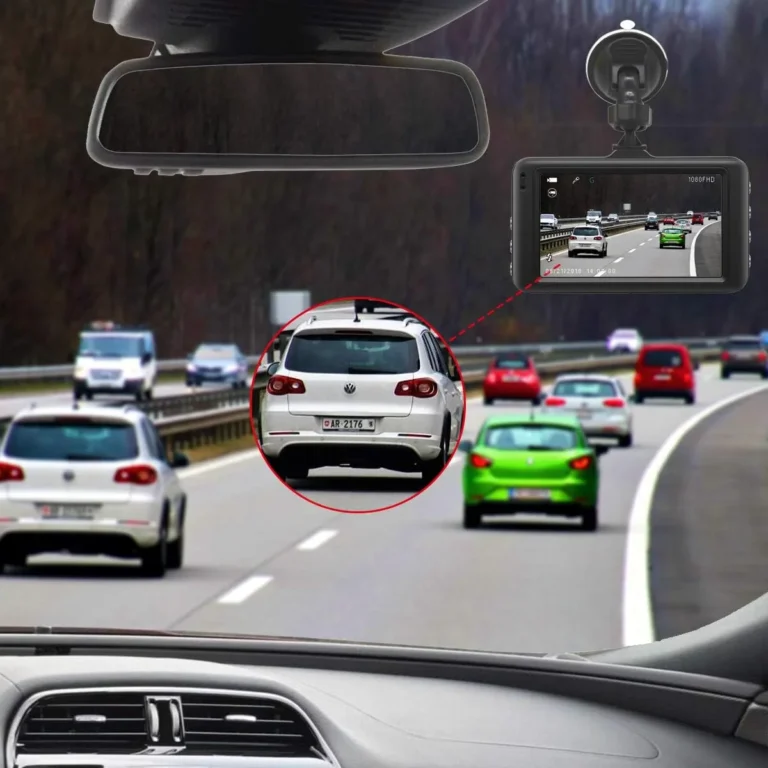
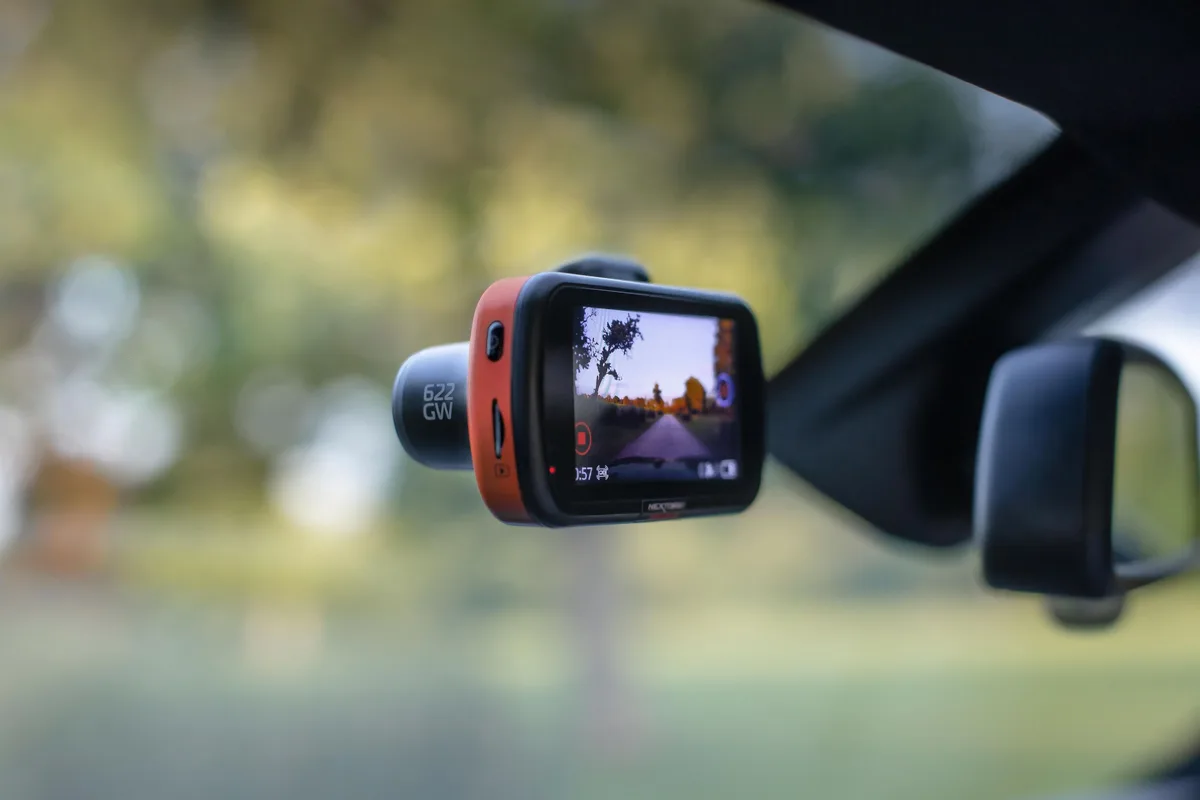
Mounted behind the rearview mirror, angled slightly below horizontal so the hood sits at the bottom of the frame. Field of view is typically 140° to 170°. Wider than 170° and you start seeing fisheye distortion at the edges.
Rear camera (the add-on)
Mounted high on the rear window, often with a smaller sensor and slightly lower resolution to keep costs and heat down. Records the same loop cycle as the front, so both files share a timestamp and can be reviewed side-by-side.
Interior / IR camera (the rideshare unit)
Common in Uber, Lyft, taxi, and fleet vehicles. Adds a third lens pointing into the cabin, usually with infrared LEDs around it so it can record passengers in total darkness. Some jurisdictions require visible disclosure that the cabin is being recorded.
California's two-party consent rules mean rideshare drivers usually disable audio or post a clear placard on the visor.
What multi-channel systems share
All lenses usually share the same G-sensor, GPS, and SD card, but write to separate folders. Some cameras use two cards (one for front, one for rear). Either way, the loop cycle is synchronized so a single event locks footage from every channel.
Capacitor vs. Battery: How Power Source Changes Behavior
The power source inside a dash cam looks tiny but decides whether the camera survives a hot summer or swells up in your glovebox.
Supercapacitor models
A supercap stores just enough energy (a few farads at 2.7V to 5.4V) to close the last file cleanly after power loss. It handles -20°C to about 70°C and doesn't degrade from sitting at full charge. That's why almost every premium dash cam uses a capacitor instead of a battery.
Lithium-ion battery models
Cheaper cameras often use a small Li-ion cell, usually 300 mAh to 600 mAh, so they can run for 10 to 30 minutes unplugged. That sounds nice, but Li-ion cells degrade fast in parked cars. Sustained cockpit temps above 60°C can swell the cell, and a swollen cell behind a windshield has been known to crack the housing.
Not worth the convenience.
When a battery actually makes sense
If you only drive short trips in a temperate climate and need a quick parking snapshot without hardwiring, a battery model is fine. Otherwise, capacitor wins on lifespan, heat tolerance, and safety. NHTSA's broader guidance on in-cabin electronics reinforces the same principle: passive thermal loads in vehicles routinely exceed what consumer Li-ion packs are rated for.
How Footage Is Stored and Why SD Card Choice Matters
Your footage lives on a microSD card, and that card is the most failure-prone part of the whole system. Pick the wrong card and the loop will stutter, drop frames, or corrupt files at the worst possible moment.
Endurance cards vs. standard cards
A standard card is rated for casual cameras and phones. An endurance card is rated for continuous write cycles, often 26,000 to 60,000 hours of 4K recording. That's the spec you want.
Cards like the Samsung PRO Endurance, SanDisk High Endurance, and WD Purple SC are designed for this exact workload.
Speed class and why it matters
Look for U3 / V30 ratings minimum. U1 cards (10 MB/s minimum write) often choke at 4K, dropping frames or stopping recording silently. V30 guarantees 30 MB/s sustained write, which is enough for almost every dash cam on the market in 2026.
How often to replace the card
Even endurance cards wear out. Plan to swap your card every 12 to 24 months if you're driving daily. Format it in-camera, not on a PC, every 4 to 6 weeks to keep the file system clean.
Most cameras prompt you to format on the first boot of each month, which is a good reminder to actually do it.
Powering the Dash Cam: Cigarette Lighter vs. Hardwire
Two ways to feed the camera power, and the choice changes how the camera behaves more than you'd think.
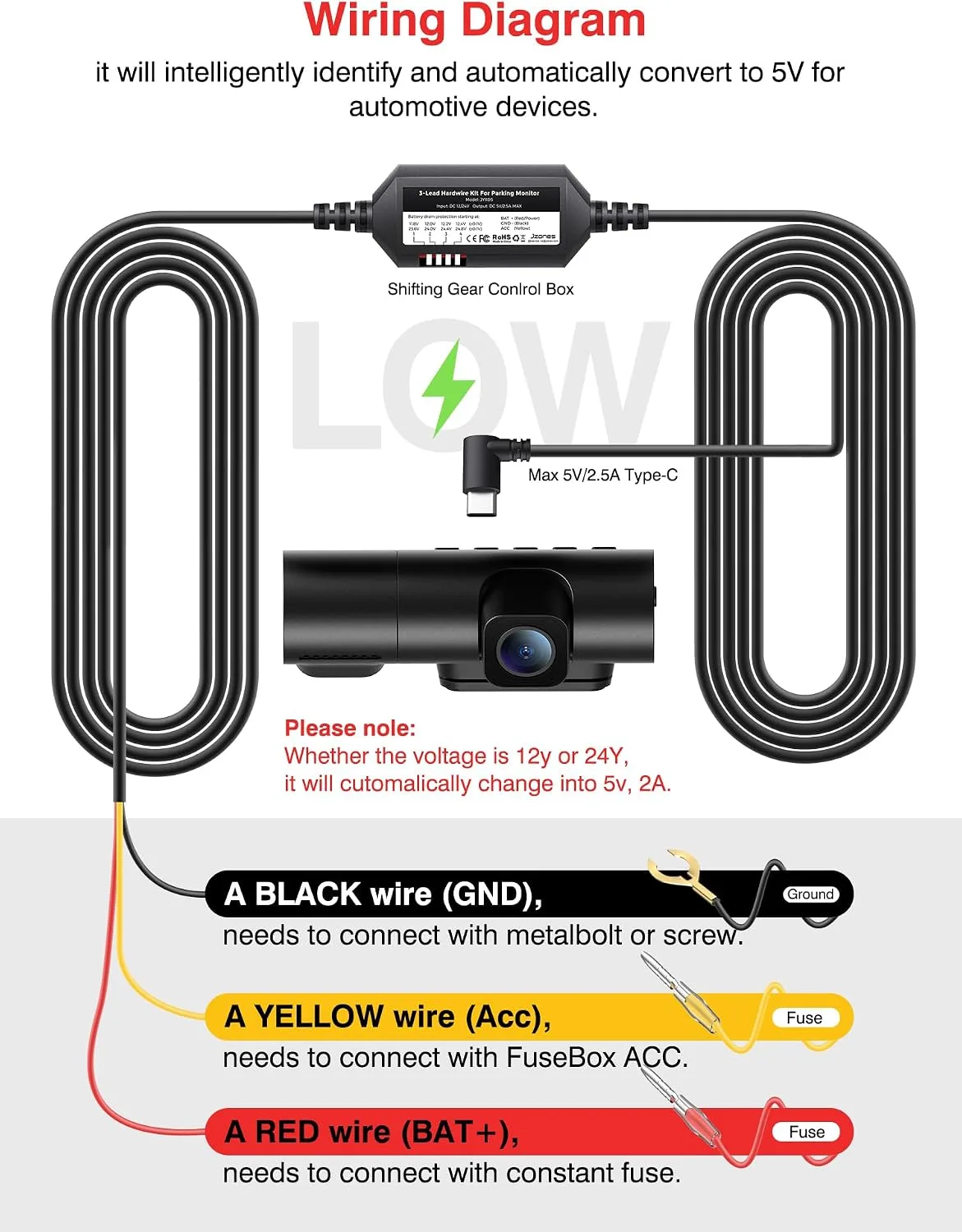
Cigarette lighter power
Plug the adapter into the 12V outlet and the camera turns on and off with the ignition (on most cars). Simple, no tools, easy to swap between vehicles. Drawback: the outlet often turns off a few minutes after ignition off, so parking mode usually won't work without a battery pack or always-on outlet.
Hardwiring to the fuse box
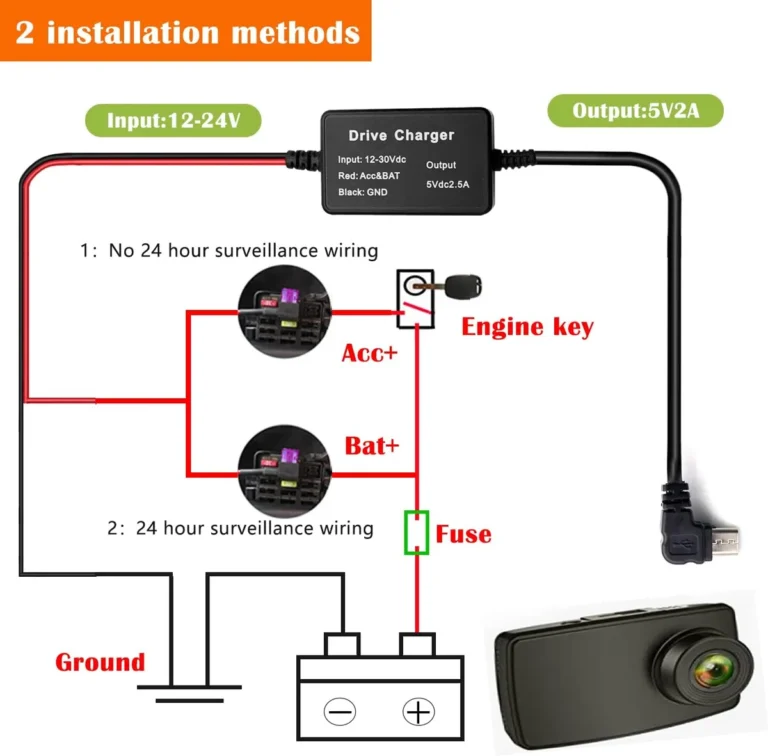
A hardwire kit taps into two fuses (one ignition-switched, one constant), a ground point, and the camera. The kit's voltage monitor watches the battery and cuts power before it drains. Drawback: install takes 20 to 45 minutes, and a botched fuse tap can cause electrical gremlins.
If you're not comfortable pulling fuse panels, pay a shop.
Which fuse slots to use
| Fuse Type | Behavior | Typical Use |
|---|---|---|
| Ignition-switched (e.g. radio, cigarette lighter) | Live only when key is on | Powers the camera's main recording |
| Constant (e.g. dome light, horn) | Live always | Powers parking mode and low-voltage cutoff |
Pick a switched fuse rated 10A or higher to avoid overloading the circuit, and use an add-a-fuse tap so the original fuse still protects its original load. Most hardwire kits ship with a low-profile ATO or mini-ATO tap.
What to check after hardwiring
Start the car and confirm the camera boots. Shut it off and confirm it enters parking mode after the configured delay (usually 5 to 30 seconds). Leave the car overnight and check battery voltage in the morning.
If the engine cranks slower than usual, raise the cutoff threshold.
What Happens During an Actual Crash (Step-by-Step)
Here's the second-by-second flow when the worst happens, because it's the moment the camera either earns its price tag or doesn't.
- Pre-impact. You're driving along. The camera is writing segment 247 to the SD card. GPS is logging. G-sensor is sampling at 100 Hz.
- Impact. Your car hits something. Deceleration spikes past the G-sensor threshold. The processor flags the current frame.
- Event lock. The camera locks the current segment, the previous segment (pre-roll), and starts buffering the post-impact frames.
- Power loss. Airbags may have deployed, your ignition may have cut, or the cable popped loose. The supercap takes over.
- Clean shutdown. The processor finalizes the protected file, writes a small "event" log entry, and powers down within 5 to 10 seconds.
- Aftermath. You pull the SD card or open the app. The protected folder contains the crash clip, often 30 to 60 seconds of pre- and post-roll, with GPS, speed, and a clean timestamp.
Why pre-roll matters
Without pre-roll, the camera would only capture the crash and after, which often looks like a frozen scene. Pre-roll shows the lead-up, which is what proves who had the green light, who was already braking, and who ran the stop sign. Insurance adjusters read pre-roll before they read anything else.
Common Dash Cam Problems and What Causes Them
Even a great dash cam has a few classic failure modes. Knowing them upfront saves you the "why is my footage gone" panic later.
Footage overwrote during a critical event
Usually a sensitivity problem. The G-sensor threshold is set too low, so every speed bump and pothole fills the protected folder. Once the protected folder hits its cap (often 20% to 30% of the card), older events start overwriting.
Fix: raise the threshold and free up space.
SD card failure
Counterfeit cards are the usual culprit. A "128GB" card bought for $8 online is often a 16GB card relabeled. Once you write past its real capacity, files corrupt.
Fix: buy from a reputable retailer and check the card with H2testw before trusting it.
Overheating in summer
Capacitor cameras handle heat far better than battery ones, but even capacitors have limits. Sustained cabin temps above 70°C can cause thermal shutdown. Fix: use a sunshade, park in shade, and remove the camera from the windshield on multi-day hot parking if possible.
Suction-cup detachment
Suction mounts lose grip when the windshield is warm or dirty. Adhesive mounts hold better but are harder to reposition. Fix: clean the glass with isopropyl alcohol before mounting and press the adhesive firmly for 30 seconds.
Time and date reset after power loss
Usually means the internal coin cell battery that backs up the clock is dead. Most cameras use a CR2032 or similar. Fix: replace the coin cell.
If there's no coin cell, the camera re-acquires time from GPS, which takes a few seconds after each boot.
Parking mode draining the car battery
Either the low-voltage cutoff is set too low, or the camera is plugged into an always-on outlet that bypasses the cutoff. Fix: raise the cutoff to 12.2V or higher, and verify the hardwire kit's voltage monitor is actually wired to constant power.
When Dash Cam Footage Becomes Court-Admissible Evidence
Recording the crash is half the battle. Getting it admitted in court or accepted by an insurer is the other half. A few rules of thumb apply broadly in the US and UK, though specifics vary by jurisdiction.
Chain of custody
The footage is most credible when you can show it hasn't been edited. Export the original file (not a screen recording). Keep the SD card in a safe place.
If you share it, share the original MP4 or MOV file with metadata intact. Many desktop players preserve metadata when exporting, but re-encoding can strip GPS data.
Time and location integrity
GPS timestamped footage is far harder to dispute than a clip with a wrong clock. That's one more reason to keep GPS enabled and let the camera set time from satellites rather than relying on a manual date.
Audio recording laws
Eleven US states require two-party consent for audio recording: California, Connecticut, Florida, Illinois, Maryland, Massachusetts, Montana, New Hampshire, Pennsylvania, and Washington. If you record audio inside the cabin in one of those states without passenger consent, the audio can be excluded or, in some cases, expose you to criminal liability. Video without audio is generally fine.
Windshield obstruction rules
Many US states limit what you can mount on the windshield. California Vehicle Code § 26708, for example, restricts items in a 7-inch square in the lower corner of the windshield on the passenger side and a 5-inch square in the lower driver's side. Mount your dash cam in that lower corner band to stay compliant.
The ICO in the UK has similar guidance for drivers regarding privacy notices when recording outside the vehicle.
The Right Dash Cam Setup for Your Driving Situation
The best dash cam is the one that matches how you actually drive. Here's how the choices line up for common scenarios.
| Situation | Best Setup |
|---|---|
| Daily commuter | Single-channel 1080p or 1440p capacitor, hardwired, 128GB endurance card |
| Rideshare / taxi | Dual-channel with IR interior camera, high-endurance 256GB card, audio disabled or placard posted |
| Fleet / commercial | Multi-channel with cloud telematics, GPS tracking, hardwired with low-voltage cutoff |
| Hot climate | Capacitor model only, adhesive mount, sunshade |
| Cold climate | Capacitor with low-temp rating (-20°C), heated parking if possible |
| Long-term parking | Hardwired with 12.4V cutoff, motion + buffered parking mode, dedicated parking cell on SD card |
A quick decision shortcut
If you drive less than an hour a day and park in a safe garage, a single-channel 1080p capacitor model on the cigarette lighter is enough. If you commute on a busy highway or park on the street overnight, hardwire a dual-channel with parking mode. If you drive for a living, add an interior IR camera and a cloud-connected unit so footage uploads even if the camera gets stolen.
Loop Recording Settings: Segment Length and Bitrate
Loop segment length and bitrate are the two settings most drivers ignore, then blame the camera when footage is unusable. Segment length decides how big each clip is. Bitrate decides how much detail fits inside that clip.
Shorter segments (1 minute) are easier to find a specific moment in, but they create more file headers and eat slightly more storage. Longer segments (5 minutes) are more efficient but harder to scrub through after an incident. Most installers we've talked to recommend 3-minute segments as the daily-driving default.
Bitrate is where image quality actually comes from, not just resolution. A 1080p clip at 20 Mbps will out-detail a 4K clip at 25 Mbps because the higher-bitrate file packs more data per frame. If license plates matter to you, look at bitrate specs first and resolution second.
Field of View vs. License Plate Readability
Field of view is the lens's horizontal sweep, usually 140° to 170° on consumer dash cams. Wider angles capture more of the road but distort the edges. Narrower angles lose the lanes beside you but keep details readable at distance.
For license plates, what matters is pixels per degree, not raw field of view. A 4K camera at 140° and a 1080p camera at 140° will both fit the same width of road, but the 4K camera has more pixels to spread across that width. That's why a 4K camera can resolve a plate at 30 feet that a 1080p camera can only read at 15.
Aim for 140° to 160° for daily driving. Anything wider and you lose edge sharpness on plates and stop signs. Anything narrower and you miss what happens two lanes over.
MicroSD Endurance Ratings Explained
The endurance rating is the single most useful spec on a microSD card, and it's almost never the headline number. The headline is capacity (128GB, 256GB, 512GB). The endurance rating tells you how long the card will last under continuous writing.
A standard card might be rated for a few hundred hours of total write cycles. An endurance card is rated for 26,000 to 60,000 hours. In a dash cam, where the card is being written 24/7, that gap is the difference between a card that dies in 6 months and one that lasts 5 years.
| Card Type | Typical Endurance | Best For |
|---|---|---|
| Standard (U1, U3) | ~2,000 to 5,000 hours | Phones, casual cameras |
| High Endurance (U3, V30) | ~26,000 hours | Daily-driver dash cams |
| Max Endurance / Industrial | ~43,000 to 60,000 hours | Fleet, taxi, 24/7 recording |
Match the card to your recording hours. If you drive 2 hours a day, a high-endurance card will outlast your car.
Hardwire Kit Low-Voltage Cutoff
The low-voltage cutoff is the number that decides whether your camera is a guardian or a dead-battery culprit. Most hardwire kits let you set this between 11.6V and 12.4V. Default is often 11.8V.
A healthy car battery at rest sits around 12.6V. Letting it drop to 11.8V means you've drained roughly 70% of usable capacity, which is enough to leave you with a slow crank on a cold morning. Set the cutoff to 12.2V or 12.4V if your climate is mild.
That cuts the camera off earlier but leaves the battery with enough juice to start the engine comfortably. In cold climates, lean toward the higher threshold because cranking amps drop with temperature.
Capacitor vs. Lithium-Ion Heat Tolerance
Heat is the silent killer of in-car electronics. Cabin temps can hit 70°C on a summer afternoon, even higher on a dark dashboard. That's well past what most consumer Li-ion cells are rated for (typically 60°C).
Supercapacitors handle this range with no swelling or degradation. They store less energy per gram, but a dash cam only needs a few seconds of backup power, which a supercap can supply.
If your camera has a built-in Li-ion cell and you live anywhere with hot summers, treat it like a hot car and a hot battery: don't leave it in direct sun, pop it off the windshield on long hot days, and replace the unit if the housing ever bulges. A swollen cell has been known to crack the lens housing or the windshield.
Insurance Discounts for Dash Cam Owners
A handful of US insurers offer 5% to 15% premium discounts for vehicles with a verified dash cam. The exact list changes yearly, but the mechanism is the same: the camera reduces fraud claims ("crash-for-cash" stings) and speeds up fault determination.
UK insurers usually don't discount but accept footage readily for claims. Australian insurers are mixed; some fleets see discounts, retail less often. Check with your carrier before you buy, because some require specific mounting (behind the mirror) or continuous power to qualify.
Cloud-Connected 4G LTE Dash Cams
Cloud-connected cameras upload footage over a cellular link, so even if the camera is stolen or the SD card is destroyed, the clip is already on a server. Live view, remote alerts, and GPS tracking come along for the ride.
The trade-off is a monthly subscription ($5 to $25) for the SIM and cloud storage, plus extra power draw. They're most useful for fleet vehicles and rideshare drivers whose footage has higher financial value. For a daily commuter, an offline camera with a quality SD card is enough.
ADAS Features in Dash Cams
Some dash cams bundle ADAS features: lane departure warning, forward collision alert, and following-distance alerts. These work by reading the video stream and flagging when you drift out of your lane or get too close to the car ahead.
The catch: these features are software estimates, not radar-grade precision. They false-alarm in rain, sun glare, and faded lane lines. If your car already has factory ADAS, the dash cam version is redundant.
If your car doesn't, the dash cam version is a useful but imperfect backup.
OEM Built-In Cameras vs. Aftermarket
Tesla's Sentry Mode, Toyota's Drive Recorder, and similar factory systems use the car's existing cameras to capture footage. They share the same loop and lock logic but tie into the car's display and storage. The advantage is integration: no extra mount, no extra wiring, no extra power draw.
The disadvantage is field of view and resolution. OEM cameras are usually narrower and lower resolution than aftermarket units, because they were designed for parking assist, not evidence. If you drive an EV with Sentry Mode, it covers parked events well.
For high-resolution driving footage, an aftermarket unit still wins.
Rideshare Driver Audio Recording Disclosure
If you drive for Uber, Lyft, or a taxi company and your camera records cabin audio, you almost always need a visible notice. Eleven US states require two-party consent (CA, CT, FL, IL, MD, MA, MT, NH, PA, WA), and rideshare platforms require disclosure stickers regardless.
A simple approach: stick a small "audio and video recording in progress" placard on the passenger-side visor. Pair it with audio disabled by default in the app. Most incidents that matter (route disputes, drop-off arguments, accidents) are captured on video alone, which sidesteps the consent issue entirely.
Fleet and Commercial Vehicle Compliance (FMCSA)
Commercial dash cam installs have an extra layer of rules. The Federal Motor Carrier Safety Administration (FMCSA) doesn't mandate cameras, but it does require that any in-cab device not obstruct the driver's view of the road or mirrors.
For ELD-integrated fleets, the dash cam often pairs with a telematics gateway that logs driver hours, harsh braking, and route deviations. That gateway and the camera usually share a GPS antenna and a power line tied to ignition-switched fused power. Hardwiring is non-negotiable for fleet installs because the camera has to wake with the truck.
FMCSA also restricts windshield mounting in commercial vehicles to the lower 6 to 8 inches of the windshield. Mounting in that band keeps the driver compliant and the camera out of the airbag deployment zone.
Windshield Obstruction Laws by State
Windshield mounting is one of those rules that varies quietly from state to state. California, for example, limits items to a 7-inch square in the lower passenger corner and a 5-inch square in the lower driver corner. Texas allows devices in a 5-inch square in the lower corner or behind the rearview mirror, mounted so it doesn't obstruct.
A safe rule across most US states: mount the dash cam behind the rearview mirror, in the lower 7-inch band, and keep it within the swept area of the wipers. That keeps it out of airbag zones, within legal bounds, and clear of rain. If you're unsure, your state's DMV site has the exact wording.
Choosing the Right Mount
Adhesive mounts (usually 3M VHB tape) hold firmer and survive heat better, but they leave residue and are hard to reposition. Suction mounts are repositionable but can fail on hot windshields.
For permanent installs, adhesive. For shared vehicles or lease returns, suction. Clean the glass with isopropyl alcohol before either mount, and press the adhesive for 30 seconds to set the bond.
A failed mount on a hot summer day is the most common cause of dash cams ending up on the floor mat.
Maintenance Schedule
A dash cam is basically a tiny computer that lives in a vibrating, hot, sunny box. Treat it like one.
Format the SD card in-camera every 4 to 6 weeks. Replace the card every 12 to 24 months even if it looks fine. Check for firmware updates every quarter through the manufacturer's app or desktop tool.
Clean the lens with a microfiber cloth whenever you notice glare creeping in.
If the camera lives in a hot climate, pop it off the windshield on multi-day parking in summer. If it lives in a cold climate, let the cabin warm up before expecting a clean boot in deep cold. These small steps double the practical life of both the camera and the card.
Frequently Asked Questions
Does a dash cam record when the car is off?
Only if it's hardwired with parking mode enabled or plugged into an always-on outlet. Cigarette-lighter power usually cuts off a few minutes after ignition, so the camera stops recording with the engine.
How long does a dash cam keep footage?
It depends on card size, resolution, and bitrate. A 128GB card typically stores 18 to 24 hours of 1080p footage before the loop overwrites the oldest unlocked file. Protected event clips stay until you delete them or the protected folder fills up.
Can dash cam footage be used in court?
Yes, in most US and UK jurisdictions, provided the chain of custody is intact and the file hasn't been edited. GPS-stamped footage with original metadata is the most defensible. Local rules on audio consent and windshield mounting still apply.
Do dash cams drain your car battery?
A hardwired camera in parking mode draws 100 to 300 mA. Most hardwire kits cut power at a configurable low-voltage threshold (usually 11.8V to 12.2V) so the engine can still start. Cigarette-lighter power usually cuts off with ignition, so there's no drain.
Is it worth getting a 4K dash cam?
4K captures more detail, which helps with license plates at distance. The trade-offs are higher bitrate (50 to 60 Mbps), more storage use, and more heat. For most drivers, 1440p hits the sweet spot between clarity and file size.
Do I need a rear camera too?
If you commute in stop-and-go traffic, a rear camera helps with rear impacts, which are the most common collision type. For pure front-end coverage, a single-channel unit is enough.
How do I know if my dash cam is actually recording?
Most cameras show a blinking red dot, a flashing LED, or a recording timer on the screen. The easiest check is to pull the SD card and open the DCIM folder on a computer. If you see fresh MP4 or MOV files with today's date, it's recording.
If the folder is empty or files are corrupt, the card likely needs reformatting or replacing.
Can I use any microSD card in a dash cam?
No. Use a high-endurance card rated U3 or V30 with at least 26,000 hours of continuous write rating. Standard cards and cheap no-name cards fail fast under constant loop recording.
The card brand and rating matter more than raw capacity.
Will a dash cam void my car's warranty?
Mounting with adhesive or a suction cup won't. Hardwiring to the fuse box is also fine if you use an add-a-fuse tap and don't splice factory wiring. If you're leasing, avoid adhesive mounts on coated windshields and check your lease return rules on glass damage.
Do dash cams work in extreme cold?
Capacitor models rated to -20°C handle most winter climates. Below that, some cameras take longer to boot or may not start until the cabin warms. Battery-based cameras can lose significant capacity below freezing, which is another reason capacitors are the default for cold-weather installs.