How to charge duralast jump starter 800: Best guide
Learning how to charge duralast jump starter 800 correctly isn't complicated, but skipping the right steps can shorten its lifespan or leave you stranded. Most owners grab the wall plug, top it off once a year, and wonder why the unit is dead when they actually need it. The charging process depends on whether you're doing a first-time charge, a routine top-off, or reviving a unit that's been sitting in a cold garage for six months.
The Duralast Jump Starter 800 is a lithium-ion booster rated at 800 peak amps, sold through AutoZone. Manufacturer specifications indicate the included AC adapter takes roughly 24 hours for an initial charge and around 3 to 6 hours for a top-off once the battery is partially depleted. Getting those numbers right, and matching them to the LED indicator on the front, is the difference between a jump starter that lasts years and one that dies on you.
Let's walk through what comes in the box first, because the accessories you actually have determine everything that follows.
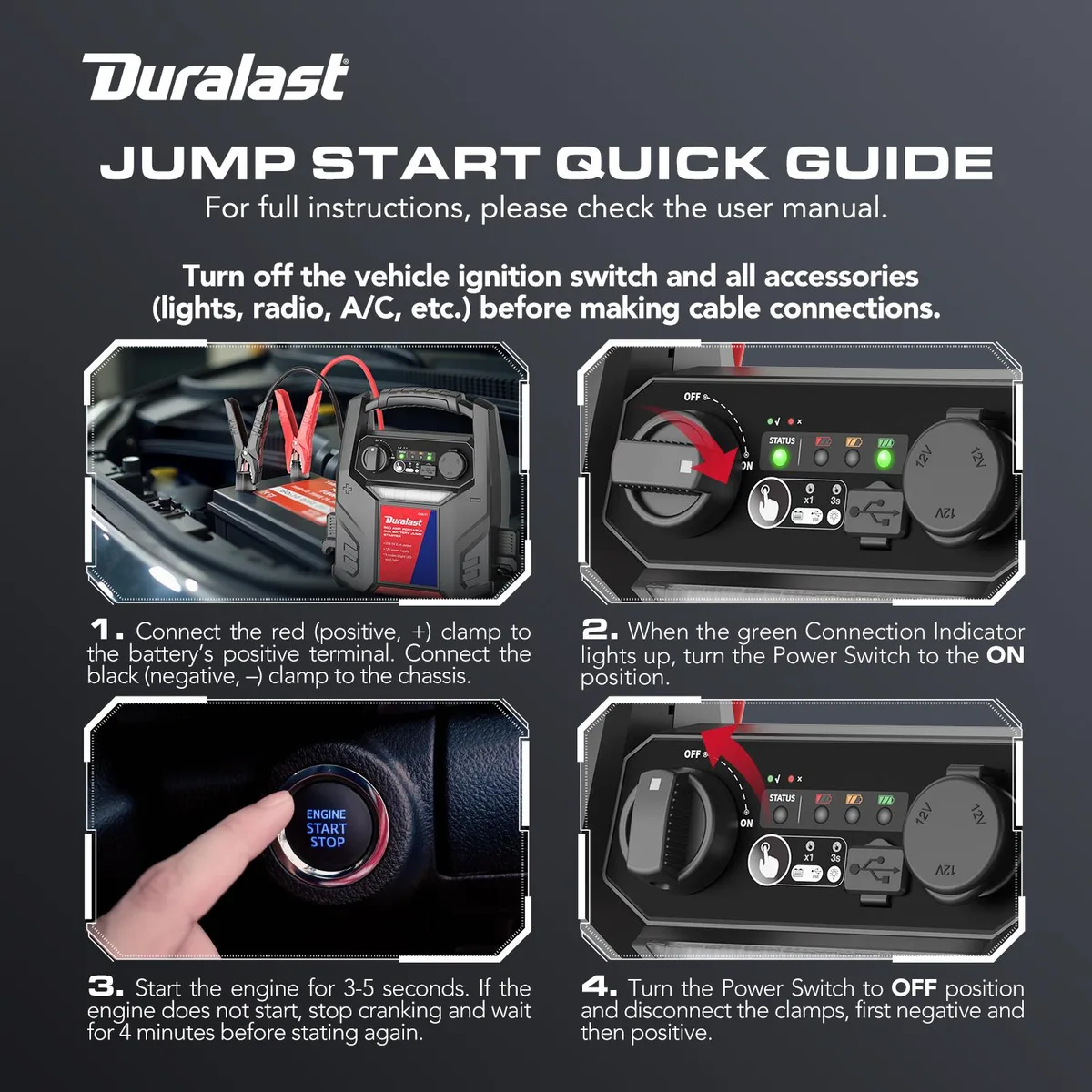
Quick Answer
To charge a Duralast Jump Starter 800, plug the included AC wall adapter into the unit's input port. Charge it for 24 hours the first time. Top-off charges take 3 to 6 hours.
The LED indicator lights show charging progress. Recharge every 3 months during storage to keep the lithium battery healthy.
What Comes in the Box (and What You Actually Need)
Before you plug anything in, take 60 seconds and lay out what shipped with the unit. Most charging headaches come from people assuming they have accessories that aren't there, or using a third-party adapter that doesn't match the input spec.
Here's what a standard Duralast 800 package includes:
- The jump starter unit itself, with built-in lithium-ion battery
- AC wall adapter (the main charger)
- 12V DC car charger cable (for charging from your vehicle)
- Smart jumper clamps with reverse-polarity protection
- User manual and warranty paperwork
- A carrying case on some retailer bundles
What you actually need for routine home charging is just the AC wall adapter. The car charger cable is a backup method, not your primary one. If you've lost the wall adapter and are tempted to grab a generic 12V or 15V power brick from a drawer, don't.
Mismatched voltage is one of the fastest ways to kill a lithium jump pack. Contact AutoZone or check the Duralast product page for a replacement.
The owner manual also matters more than people think. Manufacturer specs for your specific batch (production run, firmware revision on the protection board) can shift slightly. AutoZone publishes the Duralast Jump Starter 800 owner manual in PDF form through their support pages, and it's worth a quick scan before your first charge.
Understanding the Duralast 800's Battery and Charging System
The Duralast 800 runs on a lithium-ion battery pack, not the old-school lead-acid chemistry you'll find in larger wheeled booster packs. That single design decision changes how you should treat it during charging.
Lead-acid batteries are forgiving. You can leave them on a trickle charger for weeks, top them off whenever, and they'll recover from a deep discharge with some patience. Lithium-ion cells are different.
They're lighter, hold their charge much longer on the shelf, and deliver higher cranking amps from a smaller package. But they hate two things: being stored at 0% charge, and being charged in freezing temperatures.
The Duralast 800 has a built-in Battery Management System (BMS) that handles the actual charging circuitry. That's the small electronic board inside the unit that regulates incoming voltage, prevents overcharging, and balances the cells. When you plug in the AC adapter, you're not "pumping electricity" into the battery directly.
You're handing power to the BMS, which then carefully feeds it to the cells at the right rate.
Here's why this matters for you:
- You can't overcharge the unit by leaving the adapter plugged in too long. The BMS cuts off charging once the cells reach 100%.
- You can, however, damage the cells by storing the unit at 0% for months. The BMS protects against overcharge, not long-term deep discharge.
- Cold charging can cause lithium plating on the anode, which permanently reduces capacity. Manufacturer guidance generally recommends charging above 32°F (0°C).
Peak amperage on this unit is 800A, but that's the output spec (the power it delivers when jumping a car), not the charging spec. Charging happens at a much lower current, typically around 1 to 2 amps through the wall adapter, which is why a full top-off takes hours rather than minutes. Research on lithium-ion longevity from Battery University confirms that partial-charge storage dramatically extends cycle life.
Reading the LED Indicator Lights (Before You Plug Anything In)
The LED battery indicator on the front of the Duralast 800 is your main feedback loop during charging. Most charging confusion comes from people misreading what those little lights actually mean.
The indicator is a bar of four (sometimes five, depending on production run) small LED lights. They change based on state of charge, and the colors typically follow this pattern:
| Light Pattern | What It Means |
|---|---|
| All lights solid | Fully charged (or close to it, ~95%+) |
| 3 lights solid, 1 flashing | Charging, roughly 75% full |
| 2 lights solid, 1-2 flashing | Charging, roughly 50% full |
| 1 light solid, others flashing | Charging, below 25% |
| Red light, no others | Critically low, charge immediately |
| No lights at all | Unit is either off, fully depleted, or has a fault |
A few practical notes from our research on common user complaints:
- If the unit sits in a cold trunk overnight and shows zero lights, that's not necessarily a fault. Lithium cells can drop below their operating threshold in deep cold. Bring it inside for an hour, then try again.
- If one light is blinking red while plugged in, that's a charging error. Unplug, wait 30 seconds, and reconnect.
- The lights only illuminate when the power button is pressed or when the unit is actively charging. Don't assume a dead display means a dead battery.
Charging Method 1: Using the Included AC Wall Adapter
This is the method you'll use 95% of the time. It's straightforward once you know the steps, and the AC adapter is designed specifically for the Duralast 800's input requirements.
Follow these steps:
- Make sure the jump starter is powered off. Press and hold the power button for 2 seconds until all lights extinguish.
- Locate the input port. It's usually on the side or back of the unit, covered by a small rubber flap.
- Lift the rubber cover. Don't force it; the flap is just there to keep dust out.
- Plug the AC adapter's barrel connector into the input port. It should slide in with firm, even pressure.
- Plug the wall end into a standard 110V household outlet. Avoid extension cords if possible, and never use a power strip that's already loaded with other devices.
- Watch the LED indicator. You should see lights begin to cycle or flash, confirming charging has started.
- Leave it alone. The BMS handles the rest.
Time estimates based on manufacturer documentation and aggregate user reports:
- First-time charge out of the box: up to 24 hours. Lithium batteries often ship at around 50% storage charge for safety, and the BMS does a slow balance charge on initial cycles.
- Routine top-off from ~50% depletion: 3 to 6 hours.
- Top-off from a near-full state (75% or higher): 1 to 2 hours. The BMS slows charging as it approaches 100% to protect cell health.
A common mistake is unplugging the unit after 2 hours because it "looks" full. The LEDs can show all-bars before the cells are actually balanced. Give it the full recommended window, especially on the first charge.
Per UL listing standards for lithium battery products, the BMS is certified to terminate charging safely, so leaving it plugged in past 100% won't damage the unit, but it also won't speed things up.
Charging Method 2: Using a 12V Car Outlet While Driving
The 12V DC car charger cable is your backup option when there's no wall outlet around, or when you want to top the unit off during a long road trip. It's slower than the wall adapter, but it works in a pinch.
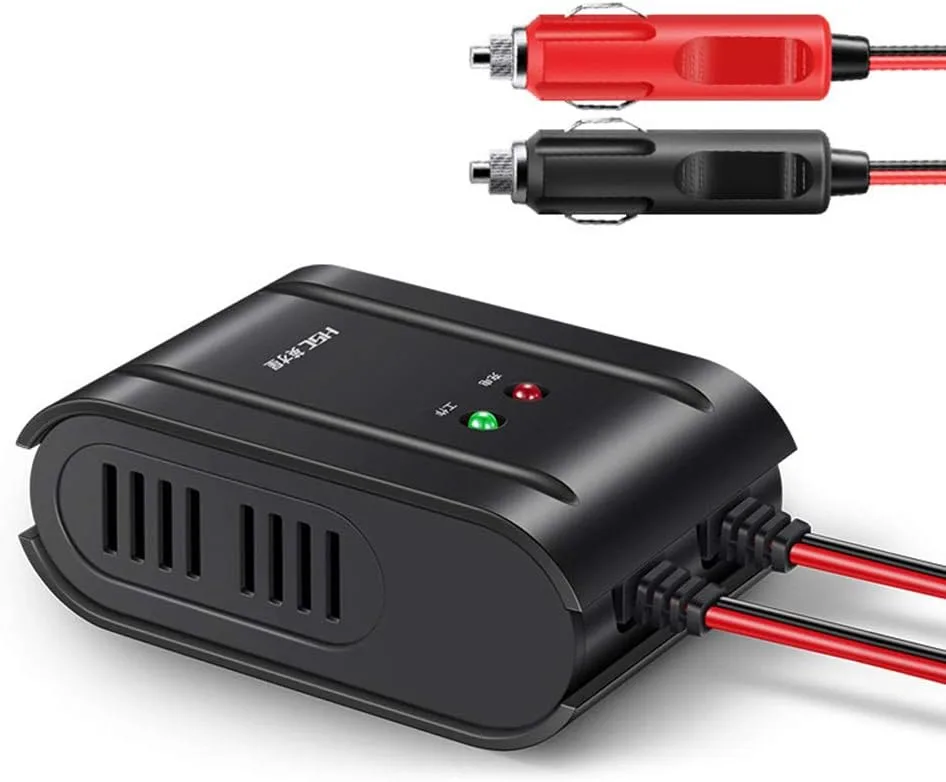
The setup is simple. Plug the barrel end into the same input port you'd use for the wall adapter. Then plug the 12V plug into your vehicle's cigarette lighter or accessory port.
The engine needs to be running, because the jump starter draws a steady draw that can drain your car's battery if you leave it plugged in with the engine off for hours.
A few practical details:
- Charging speed is slower than the wall adapter. Expect roughly 6 to 10 hours for a meaningful top-off while driving.
- The unit won't charge (or will charge very slowly) if your car's accessory port is only "live" when the ignition is in accessory mode. Most modern ports cut power when the engine isn't running.
- Don't leave the unit plugged in overnight in a parked car. A parasitic draw plus a cold battery is a bad combination.
This method is best for road-trippers, rideshare drivers, and anyone who keeps the Duralast 800 in their trunk full-time. It's a maintenance charge, not a recovery method. If your unit is fully dead, the wall adapter will always be faster.
First-Time Charge vs. Top-Off Charge (They Aren't the Same)
Treat these as two different events. Confusing them is one of the top reasons new owners either overthink their first charge or undercharge their unit forever after.
First-Time Charge (Out of the Box)
A new Duralast 800 ships from the factory at roughly 40 to 60% state of charge. That's a storage setting designed to maximize shelf life before purchase. Your first charge should be a full 24-hour session on the AC wall adapter.
Don't interrupt it. The BMS performs a slow cell-balancing cycle on initial charging, which only happens at this stage. Once you've done that first 24-hour charge, the cells will hold a more accurate "full" reading, and your LED indicator will be more reliable going forward.
Routine Top-Off (After Use or Storage)
If you've used the unit to jump a car, or it's been sitting for a few months, you're doing a top-off charge. Plug it in, watch the LEDs cycle up, and leave it for 3 to 6 hours. The BMS will terminate charging automatically when full.
You don't need to babysit it.
Here's a quick reference:
| Charge Type | Duration | Notes |
|---|---|---|
| First-time from box | Up to 24 hours | Full balancing cycle, don't interrupt |
| After a single jump start | 2 to 4 hours | Cells deplete ~10 to 20% per jump |
| After storage (3+ months) | 4 to 8 hours | Depends on self-discharge rate |
| Top-off before long trip | 2 to 3 hours | Bring to full before departure |
How Long Should You Charge It? (Timeline by Situation)
Real-world charging times depend on three variables: how empty the unit is, what charger you're using, and the ambient temperature. Lithium cells charge slower in cold conditions and faster (up to a BMS limit) in moderate warmth.
A practical timeline based on manufacturer specs and aggregate user reports:
- 0% to 25%: roughly 2 to 3 hours on the wall adapter. The BMS pushes maximum current at the start of the cycle.
- 25% to 75%: another 2 to 3 hours. Charging rate stays high but starts to taper slightly.
- 75% to 100%: 1 to 3 hours. The BMS slows charging to protect cell longevity. This last 25% always feels slow.
Total realistic time from empty to full on the wall adapter is 4 to 8 hours under normal conditions. If your timeline doesn't match this, something is off. Either the unit wasn't as depleted as you thought, the ambient temperature is very cold, or the adapter isn't delivering proper current.
One shortcut: if you're unsure how depleted the unit is, press the power button before plugging in. The LED bar will show current state of charge. Compare that to the table above and you'll have a much better time estimate.
What to Do If Your Duralast 800 Won't Charge or Power On
This is the most common support call for any lithium jump starter. The unit sat in your garage for a year, you grab it in an emergency, and nothing happens. Before you assume it's dead, work through this decision tree:
Step 1: Try a Different Outlet
The wall outlet might be the problem, not the unit. Plug a lamp or phone charger into the same outlet to confirm it's live. If it's a GFCI-protected outlet (the kind with the test/reset buttons common in garages and bathrooms), check whether it has tripped.
Step 2: Inspect the Adapter and Cable
Look at the AC adapter for any visible damage. Frayed wires, bent prongs, or a barrel connector that's wobbly in the port all point to a charger problem, not a battery problem. Try wiggling the connector gently while plugged in.
If the LEDs flicker on and off as you move it, the cable is failing internally.
Step 3: Force a Reset
Some Duralast 800 units have a reset pinhole on the side, similar to a router. Insert a paperclip and press for 10 seconds. This can clear a BMS lockout if the unit detected a fault and shut itself down as a safety measure.
Step 4: Try the 12V Car Charger Method
If the wall adapter method fails, try the 12V DC car charger with the engine running. A working BMS will accept a charge from either input. If the unit responds to the car charger but not the wall adapter, you've isolated the problem to the AC adapter itself.
Step 5: Long Rest, Then Try Again
If the unit has been deeply discharged for months, the BMS may have put it into "protection mode" to prevent cell damage. Leave it plugged into the wall adapter for 24 to 48 hours without unplugging. The BMS will sometimes wake up and slowly trickle-charge cells that have dropped below the safe threshold.
If none of these steps revive the unit, the battery is likely permanently damaged from prolonged storage at 0%. That's not a defect; it's lithium-ion chemistry. Replacement is the only option at that point.
Charging Mistakes That Kill Jump Starter Batteries Early
Most premature jump starter failures trace back to one of these patterns. If you've owned more than one lithium booster, you've probably hit at least one of them.
Storing the unit at 0% is the fastest killer. Lithium cells self-discharge slowly, even when the unit is off. Over 6 to 12 months, a fully depleted battery can drop below the BMS's safe threshold.
Once that happens, the cells won't recover. The fix is simple: top off the unit before long-term storage.
Charging in freezing temperatures causes permanent capacity loss. Lithium cells can discharge in the cold, but charging them below 32°F (0°C) risks lithium plating on the anode. If your Duralast 800 has been sitting in a freezing car overnight, bring it inside for an hour before plugging it in.
Using third-party adapters with wrong voltage specs is a slow burn. A 12V adapter might fit the port, but the BMS expects a specific input profile. Wrong voltage can stress the protection board over time, even if the unit seems to charge normally at first.
Leaving the unit plugged in 24/7 doesn't help. The BMS stops the charge at 100%, so leaving it on the adapter indefinitely won't overcharge the cells. But constant top-ups keep the cells at high voltage, which accelerates long-term capacity loss.
Charge it, unplug it, store it.
Ignoring a swollen or hot unit is dangerous. If the case bulges or the unit gets unusually warm during charging, stop immediately. These are signs of cell failure.
Per OSHA general guidance on battery handling, a swollen lithium battery should be taken to an appropriate recycling center, not thrown in household trash.
Storage and Long-Term Battery Maintenance Between Uses
A jump starter that sits for months between uses needs a little care. The goal is to keep the cells between 50% and 75% state of charge, in a dry environment at room temperature.
Manufacturer guidance and Battery University research on lithium-ion storage both point to the same conclusion: storing cells at partial charge, rather than full or empty, dramatically slows long-term degradation. For the Duralast 800, that means:
- Charge the unit to roughly 75% before putting it away. Three lit LEDs on the indicator is a good visual marker.
- Recharge every 3 months. Self-discharge is slow, but it adds up. A 5-minute wall charge every quarter is enough to top it back up.
- Store indoors if possible. A climate-controlled closet beats a freezing garage or a hot trunk.
- Avoid leaving it in direct sunlight. Dashboard temperatures in summer can exceed 150°F, which is well outside the safe range.
If you use the unit regularly, you don't need to follow a strict maintenance schedule. Just plug it in after each use and top it off before the next time you need it.
Charging in Extreme Temperatures: What Works and What Doesn't
The Duralast 800 is rated to operate in a wide temperature range, roughly 0°F to 120°F. Charging, however, has a narrower window.
Cold Weather Charging (Below 32°F / 0°C)
Don't charge the unit in freezing temperatures. The risk of lithium plating is real, and it permanently reduces capacity. If the unit has been in a cold car overnight, bring it inside for an hour before plugging in.
Warming the cells to at least 50°F is ideal.
Hot Weather Charging (Above 100°F / 38°C)
Heat is the bigger long-term enemy of lithium cells. Charging in direct summer sun or inside a hot car can push the cells toward their thermal limit. The BMS will throttle or stop charging if it detects overheating, but it's still better to charge in a shaded, room-temperature environment.
What About Jumping in Extreme Cold?
The unit can discharge (jump a car) in much colder conditions than it can charge. That's an important distinction. If your car battery dies in a Minnesota January, the Duralast 800 can still deliver cranking amps to start the engine.
You just need to charge it back up indoors afterward.
Safety Warnings You Shouldn't Skip While Charging
Lithium jump starters are safe when treated correctly, but they pack enough energy to cause real damage if mishandled.
Never charge near flammable materials. A lithium cell venting during a fault event can ignite nearby vapors. Charge on a hard, non-flammable surface like a concrete floor or a metal workbench, not on a couch or carpet.
Don't use damaged cables. A charger cable with exposed wire or a loose connector can arc, spark, or deliver uneven voltage. Replace any cable showing wear.
Stop charging if you smell something sweet or chemical. That's a sign of electrolyte venting, which means a cell is failing. Unplug the unit, move it to a safe area, and don't use it again.
Avoid sub-freezing charging. We covered this above, but it bears repeating. Cold charging is the single most common cause of long-term capacity loss in consumer lithium products.
Keep the unit dry during charging. Water and lithium cells are a bad combination. The Duralast 800 has some splash resistance, but it's not waterproof.
Charging in the rain or on a wet surface is asking for trouble.
Quick Troubleshooting Guide for Common Charging Issues
| Problem | Likely Cause | Fix |
|---|---|---|
| LEDs don't light up when plugged in | Bad outlet, bad adapter, or fully depleted BMS lockout | Try a different outlet. Try the 12V car charger. Leave plugged in for 24 hours. |
| One red LED flashing | Charging fault detected | Unplug, wait 30 seconds, reconnect |
| Unit gets warm during charging | Normal behavior, BMS regulating current | Monitor, but no action needed unless it's hot to the touch |
| LEDs all on, but unit won't jump a car | Cells are full but clamps aren't connecting | Check clamp connections and battery posts for corrosion |
| Unit died mid-jump | Cells were lower than LED indicator showed | Recharge fully (24 hours), then test |
| Charging takes much longer than expected | Cold environment, weak adapter, or aged cells | Move to room temperature, replace adapter, consider replacement if cells are old |
Your Charging and Maintenance Checklist
Before you wrap up, here's a tight checklist you can run through every quarter or after each use:
- Charge the unit after every jump start, even if you only used a small amount of capacity.
- Top off to roughly 75% before long-term storage.
- Recharge every 3 months during storage.
- Charge indoors at room temperature whenever possible.
- Use only the included AC adapter or 12V DC car charger.
- Inspect cables for damage before each charge.
- Press the power button before charging to confirm current state of charge.
- Don't charge in freezing temperatures without warming the unit first.
- Don't ignore a swollen case, a sweet smell, or excessive heat.
- Replace the unit if it won't hold a charge after a full 24-hour cycle.
That's the whole routine. Five minutes of attention every few months keeps the Duralast 800 ready when you actually need it.
Frequently Asked Questions
How long does it take to fully charge a Duralast Jump Starter 800 the first time?
The first-time charge takes up to 24 hours on the included AC wall adapter. This longer initial cycle lets the Battery Management System balance the cells. Don't interrupt it, even if the LEDs show full bars early on.
Can I charge the Duralast 800 with a phone charger or laptop brick?
No. The Duralast 800 requires the specific AC adapter that shipped with the unit, or the included 12V DC car charger. Generic USB power bricks don't deliver the right voltage or current, and they can damage the BMS over time.
How do I know when the Duralast 800 is fully charged?
The LED indicator lights will all be solid (not flashing) when the unit reaches full charge. The BMS will also stop drawing current, so the adapter will feel cool rather than warm after several hours at full.
Is it safe to leave the Duralast 800 plugged in overnight?
Yes, the BMS prevents overcharging. The unit will stop accepting current once the cells hit 100%. For long-term storage, though, unplug after charging and top off every 3 months instead of leaving it on the adapter indefinitely.
What's the best way to store the Duralast 800 between uses?
Store it indoors at room temperature, charged to roughly 75% (about three LED bars). Recharge every 3 months. Avoid garages that drop below freezing and trunks that heat up in summer sun.
Why won't my Duralast 800 turn on after sitting in storage for months?
The cells likely dropped below the BMS safety threshold during storage. Leave it plugged into the AC adapter for 24 to 48 hours without unplugging. If it still doesn't respond, the battery is probably permanently damaged and needs replacement.