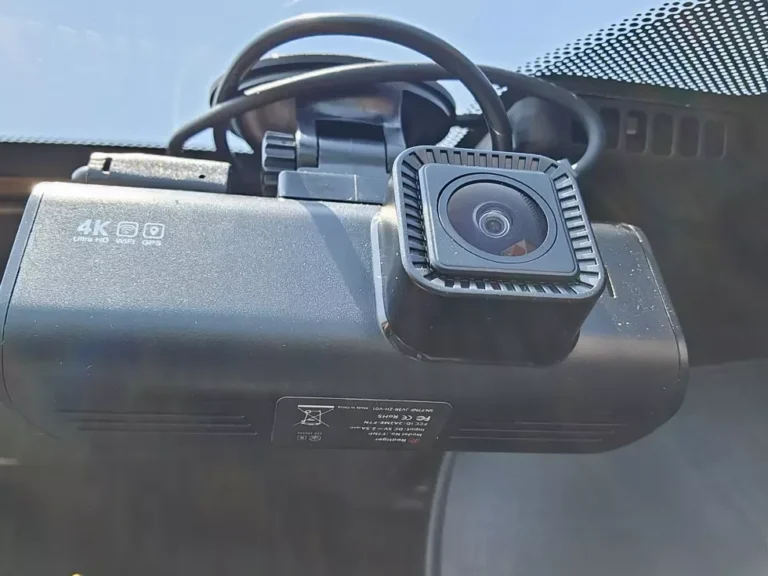
How to hardwire viofo dash cam: Best guide
Plugging your Viofo into the cigarette lighter works, but the wire hanging across the dash looks rough, blocks your view, and stops charging the second you turn the car off. That's why so many owners look up how to hardwire a Viofo dash cam the moment they want parking surveillance. A hardwire kit ties the camera directly into the fuse box, so it powers on with the ignition, switches to parking mode when you walk off, and shuts itself down before it kills your battery.
Done right, the whole job takes 30 to 45 minutes with a fuse tap, an add-a-circuit, and the correct kit for your model (HK3, HK4, HK5, or HK6). Done wrong, you risk triggering airbag warnings, blowing fuses, or waking up to a dead 12V. This guide walks you through the process the way installers actually do it, including the gotchas most generic tutorials skip.
Quick Answer
To hardwire a Viofo dash cam, match the right kit to your model, find a switched (ACC) and constant fuse in your vehicle's fuse box, install an add-a-circuit fuse tap into each slot, ground the kit's black wire to a bare chassis bolt, route the cable behind the headliner and A-pillar trim, and set the low-voltage cutoff to protect your battery. As of 2026, Viofo's HK3, HK4, HK5, and HK6 kits all use the same wiring method, just different connectors.
What Hardwiring a Viofo Dash Cam Actually Does (and Why It Matters)
Hardwiring connects your dash cam straight to the vehicle's electrical system instead of the 12V accessory socket. That single change unlocks three things the cigarette lighter plug cannot give you: automatic power on/off with the ignition, true parking mode that runs while you're parked, and a clean install with zero cables draped across the dashboard.
Most Viofo models, like the A129 Pro, A139, A139 Pro, and T130, draw roughly 0.2 to 0.5A at 5V. That is light enough for the camera to run for days in parking mode without straining the car's electrical system, but only if you set a low-voltage cutoff. The cutoff tells the hardwire kit to cut power if the battery drops below a safe voltage, which prevents a no-start morning.
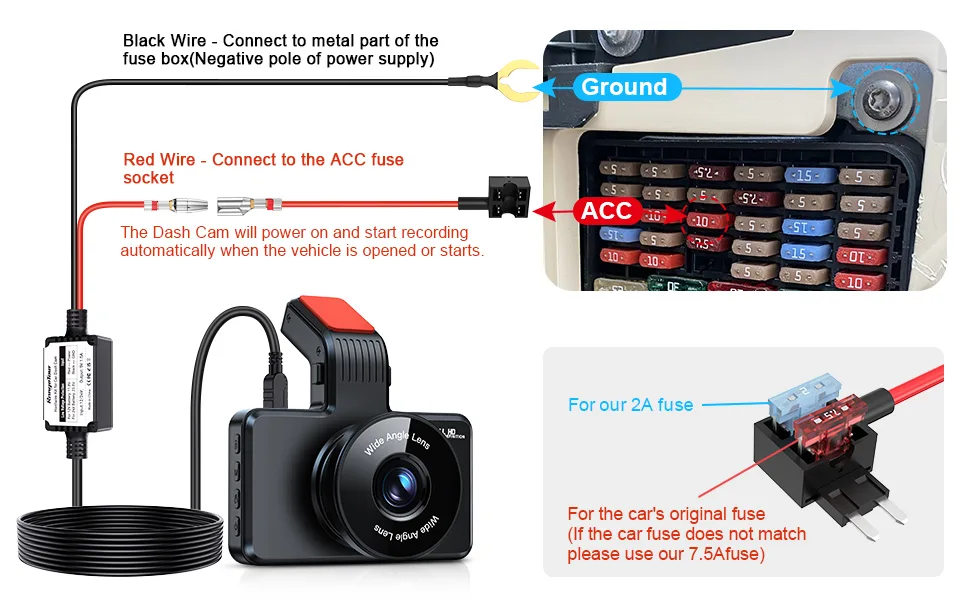
A hardwire kit is essentially a voltage-monitoring power cable with three leads. Red goes to a constant fuse. Yellow goes to a switched (ACC) fuse.
Black bolts to chassis ground. The kit converts the car's 12V down to the 5V your dash cam needs, and the internal cutoff board handles the parking-mode brain.
Tools and Parts You'll Need for a Clean Hardwire Install
Before you start pulling trim, line everything up on a workbench. A smooth install is mostly about preparation, and most "how to" guides skip the part where you realize halfway through that your fuse tap is the wrong size.
Here is the basic kit list:
- Viofo hardwire kit matched to your camera (HK3 for older Mini-USB models, HK4 for newer USB-C models, HK5 for the A139 series 3-wire setup, HK6 for newer dual-channel cameras)
- Add-a-circuit fuse taps in the correct blade size for your vehicle (ATO/ATC, mini, micro2, or low-profile mini)
- Two replacement fuses rated to match the slots you tap
- A multimeter or 12V test light
- Trim removal tools (plastic, not metal, to avoid scratching)
- A 10mm wrench or socket for the ground bolt
- Zip ties and electrical tape
- The vehicle owner's manual showing the fuse panel layout
If you skip the multimeter, you're guessing. Aggregate installer feedback consistently reports that picking the wrong fuse is the single most common cause of dead batteries after a hardwire job. A $10 multimeter prevents a $200 tow bill.
Finding Your Vehicle's Fuse Box and Reading the Diagram
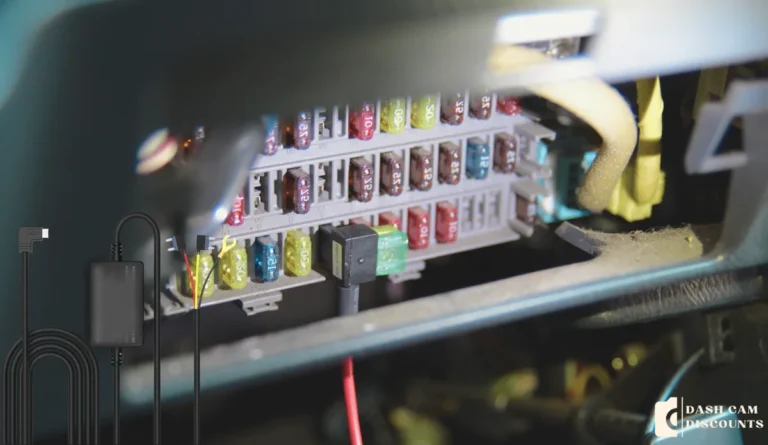
Most cars have at least two fuse panels: one inside the cabin (usually driver-side footwell or behind the glove box) and one under the hood. For a dash cam, you'll use the interior panel, because it's closer, lower-amperage, and easier to access. The under-hood box is reserved for high-draw items like cooling fans and headlights.
Pop the cover off the interior fuse box. You'll see a small diagram on the back of the lid or in section 8 of your owner's manual. That diagram lists every fuse, its amperage, and what it powers.
You're looking for two things: a switched (ACC) slot that only has power when the key is on, and a constant slot that always has power even with the car off.
Common switched slots to look for:
- Radio
- Cigarette lighter (if not already used)
- Mirror
- Accessory power
Common constant slots to look for:
- Dome light
- Door locks
- Hazard flashers
- Trunk release
Write down the fuse number and amp rating. You're going to need both when you buy the right fuse tap.
Choosing the Right Fuse Slot: Constant vs. ACC Explained
This is the part that decides whether parking mode works or doesn't. Get it wrong and either your camera never sleeps, or it dies the moment you turn the car off.
A switched (ACC) fuse only carries power when the ignition is in the accessory or run position. When you turn the key off, that fuse goes dead. The yellow wire on your hardwire kit connects here.
It tells the camera when the car is running.
A constant (always-on) fuse carries power 24/7, even when the car is parked and locked. The red wire on your hardwire kit connects here. It feeds the camera during parking mode.
Why both? Because the kit needs to know when the ignition is off. The yellow (ACC) wire signals the cutoff board that the car is off, prompting it to switch to parking mode.
If you only connect the constant wire, the camera never knows you left, parking mode never activates, and the camera keeps recording while you drive. If you only connect the ACC wire, the camera dies every time you park, and you lose parking surveillance.
Quick test: with the car off, probe the fuse's top contact with your multimeter or test light. If the light stays off, it's switched. If it lights up, it's constant.
Repeat with the ignition on. Now the switched slot should light up too, and the constant slot stays lit either way. Two fuses that meet this test are your targets.
Fuse slot cheat sheet:
| Wire color on hardwire kit | Connects to | Purpose |
|---|---|---|
| Red | Constant fuse | Powers parking mode |
| Yellow | Switched (ACC) fuse | Tells the kit ignition status |
| Black | Chassis ground bolt | Completes the circuit |
This setup is what makes parking mode work. The hardwire kit uses the yellow wire as a trigger: power on yellow equals driving mode, no power on yellow equals parking mode. That's also why a constant-only install looks "fine" at first but never actually parks.
Identifying Your Viofo Hardwire Kit (HK3, HK4, HK5, HK6)
Viofo sells four hardwire kits, and they are not interchangeable. Each one ends in a specific connector that fits a specific camera series. Using the wrong kit either won't physically plug in, or it will plug in and deliver the wrong voltage curve to your camera.
Here's how they map:
| Kit | Connector type | Compatible Viofo models | Notes |
|---|---|---|---|
| HK3 | Mini-USB | A129, A129 Pro, A129 Plus | Older kit, still widely available |
| HK4 | USB-C | A129 Duo, T130, WM1 | Standard for most newer single-channel cams |
| HK5 | 3-wire USB-C | A139, A139 Pro | Required for buffered parking mode on 3-channel A139 Pro |
| HK6 | Type-C with step-down | Latest dual-channel models | Newest in the line as of 2026 |
Manufacturer specifications confirm the HK3 and HK4 are functionally identical except for the plug. The HK5 adds a third wire for buffered recording, which means the kit wakes the camera slightly faster when motion is detected in parking mode. The HK6 is the current flagship, with a smaller inline module and tighter voltage regulation.
To identify yours, look at the camera's power port. Mini-USB is a trapezoid shape. USB-C is a small oval.
If you bought your camera in 2024 or later, you're on USB-C, which means HK4, HK5, or HK6 depending on the model number printed on the bottom of the camera body.
Don't guess this one. The wrong kit can damage the camera's power input over time, and Viofo's warranty explicitly excludes damage from non-approved power sources per the manufacturer's support documentation.
Picking the Correct Fuse Tap Type for Your Car
Fuse taps come in four blade standards, and your car uses only one. The wrong tap either won't fit, or worse, fits loosely and causes a poor connection that heats up under load.
The four standards are:
- ATO/ATC: full-size blade, common in American cars built before the mid-2000s
- Mini: smaller blade, most common in modern Japanese and Korean cars
- Micro2: even smaller, now standard in many post-2015 vehicles
- Low-profile mini: a flat variant, mostly in European cars and some newer Fords
Your owner's manual will list the fuse type, or you can pull one out and measure. A micro2 blade is about 9mm tall. A mini is about 16mm tall.
A standard ATC is about 19mm tall. If you're unsure, most auto parts stores sell a fuse-pick assortment for under $10 that lets you identify them by eye.
Also pay attention to the fuse's amp rating. If you're tapping into a 10A circuit for the radio, you need a fuse tap that accepts a 10A fuse in its lower slot (the original circuit) and lets you add a separate 2A or 3A fuse for the dash cam in the upper slot. The original fuse stays in the lower position to protect the car's circuit.
The new fuse protects the dash cam lead.
For more on automotive fuse standards and how they interact with add-a-circuits, the SAE International standards body maintains the underlying specifications for low-voltage automotive electrical systems.
How to Route the Cable Without Triggering an Airbag or Rattling Trim
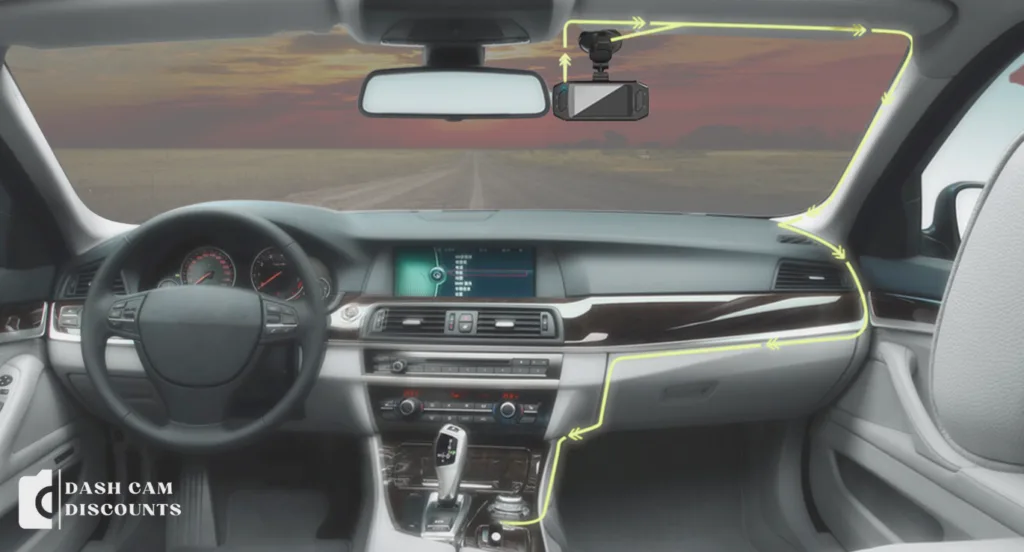
The cleanest installs hide the cable completely. Tucked behind the headliner, down the A-pillar, across to the fuse box. The trick is knowing where not to run it, because the wrong path crosses an airbag deployment zone or wedges the wire under a moving part.
Start at the camera. Press the cable into the gap between the headliner and the windshield. Use a plastic trim tool, never a screwdriver.
Run it across to the passenger-side A-pillar (or driver-side in right-hand-drive vehicles). The A-pillar trim pulls straight off with firm, steady pressure. Behind it you'll see either a curtain airbag or a bare steel pillar.
If you see an airbag label, route the cable behind the airbag, not across it. The airbag inflates outward in a crash. A cable across its path becomes a whipping hazard.
Tuck the wire along the existing factory wiring harness. There is usually a channel molded into the pillar that holds the factory wiring. Use it.
Continue down the pillar, behind the glove box or kick panel, and into the fuse box area. Secure every 12 inches with a zip tie to a factory harness or bracket. Loose cables rattle on bumps, and a rattle inside an A-pillar sounds like a loose bolt.
Step-by-Step: Wiring the Viofo Hardwire Kit to the Fuse Box
Once the cable is routed, the wiring takes about 10 minutes. Work with the car off and the key out of the ignition.
Pull the original fuse from the switched slot using the plastic fuse-pick tool. Insert that fuse into the lower slot of the fuse tap. Insert a 2A or 3A fuse into the upper slot of the tap for the dash cam.
Plug the tap into the slot. The tap's pigtail wire is your ACC connection for the yellow wire on the hardwire kit.
Repeat for the constant fuse slot. Same process: original fuse in the lower position, new fuse in the upper. The tap's pigtail connects to the red wire on the hardwire kit.
Crimp or solder the kit's wires to the fuse tap pigtails. Heat-shrink the joints. Loose crimps cause voltage drops, which trigger parking mode glitches and false low-voltage cutoffs.
Find a nearby bare metal bolt inside the cabin. Scrape off any paint with a small file. Loosen the bolt, slide the kit's black ground wire ring terminal underneath, and retighten.
A painted ground is the most common cause of dash cam reboot loops on startup.
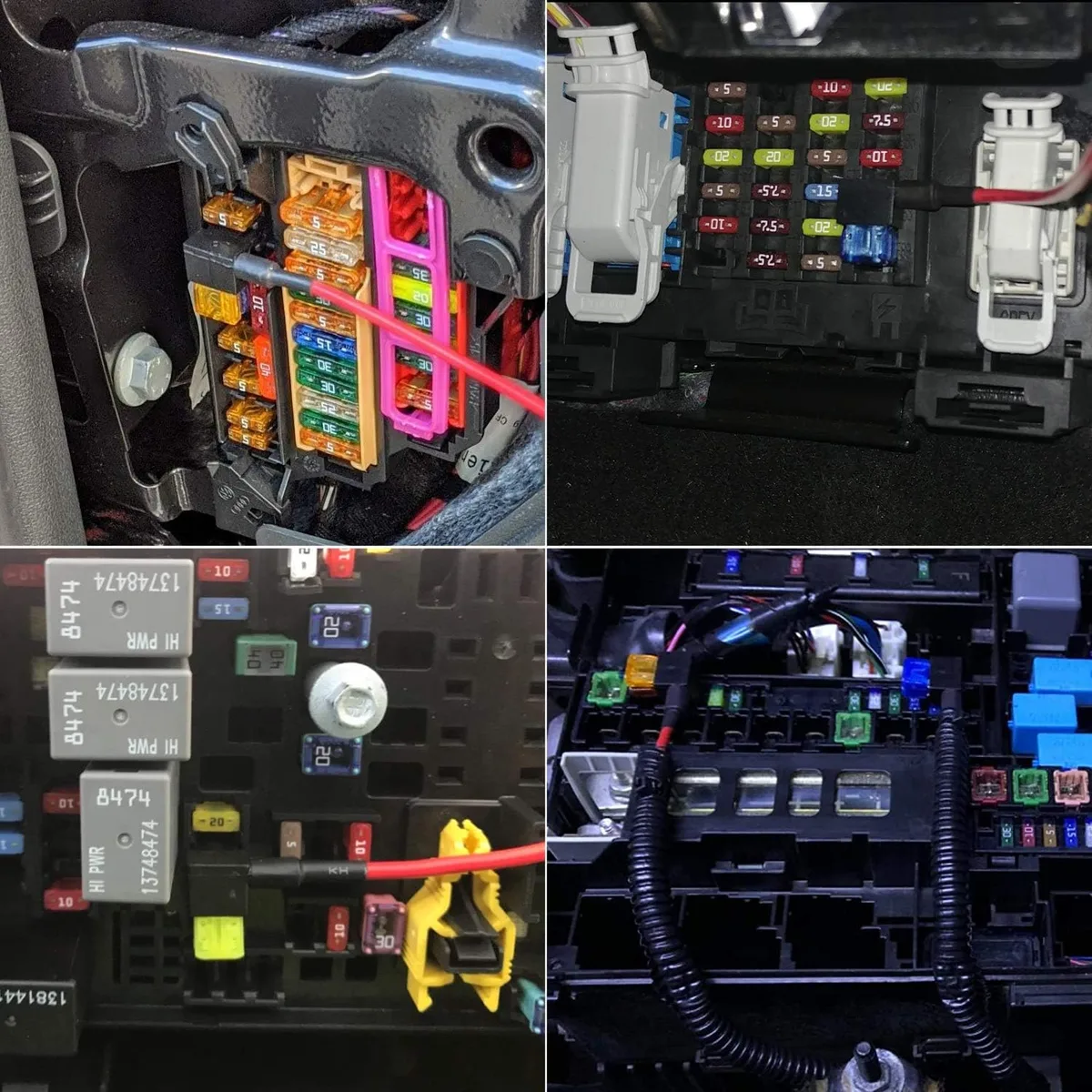
Plug the kit's output cable into the dash cam. Turn the key to accessory. If it boots, the wiring is correct.
If not, recheck the constant fuse and ground.
Setting the Low-Voltage Cutoff to Protect Your Battery
The low-voltage cutoff is a small dial or set of pins on the hardwire kit body. It tells the kit when to stop drawing power so you can still start the car in the morning. Picking the wrong threshold is the difference between "parking mode works all weekend" and "dead battery on Monday."
Most Viofo hardwire kits offer four cutoff options:
| Cutoff voltage | Best for |
|---|---|
| 11.8V | Older batteries, very cold climates |
| 12.0V | Standard lead-acid batteries |
| 12.2V | AGM or spiral-cell batteries |
| 12.4V | Lithium auxiliary batteries, EVs with sensitive 12V systems |
A healthy resting 12V battery sits at 12.6 to 12.8V with the engine off. The cutoff should trigger when the battery drops below about 80% of full charge, which is roughly 12.2V for most cars.
If your battery is more than four years old, default to 12.0V or 11.8V. Older batteries hold less capacity, and a 12.4V cutoff will trigger prematurely on them. Aggregate installer reports show that AGM battery owners get noticeably longer parking runtimes at 12.2V compared to 12.0V, because AGM holds voltage higher under load.
Mounting the Dash Cam and Hiding the Cable Behind the Headliner
Mount the camera first, then run the cable to it. Reversing the order usually leaves you with too much slack or too little.
Pick a mounting spot just below the rear-view mirror, on the passenger side of the mirror housing. This keeps the lens within the wiper sweep zone and out of the driver's line of sight. Most states require the camera to sit within a 7-inch square in the upper center or upper passenger corner of the windshield, with at least 1 inch of clear space around the rear-view mirror.
Check your local DMV's windshield obstruction rules if you're unsure.
Clean the glass with isopropyl alcohol. Let it dry. Press the adhesive mount firmly for 10 seconds.
Adhesive cures best at room temperature, so skip the install on a freezing morning.
Once mounted, run the power cable from the camera up into the headliner, across to the A-pillar, and down the path you already cleared. Leave a small service loop (about 2 inches) at the camera end. That gives you slack if you ever need to remove the mount.
Testing the Install: Ignition On, Parking Mode, and Cutoff Check
A hardwire install that powers on is only half-done. You need to confirm three behaviors before you trust it: ignition triggers driving mode, leaving the car triggers parking mode, and the cutoff actually shuts things down when voltage drops.
Start the car. The camera should boot within 5 seconds. On-screen, you should see the regular recording indicator and the date stamp ticking.
Drive for a minute. Park and turn the ignition off. Within 10 to 30 seconds, the camera should switch into parking mode (motion detection or timelapse, depending on your settings).
Confirm the parking mode LED behavior per your Viofo model's manual. Most models blink a red dot, some flash a slow blue. If the camera shuts off completely instead, the yellow ACC wire is not seeing power correctly.
Recheck your fuse choice.
To test the cutoff, leave the car parked for several hours (or overnight if you can). The next morning, the camera should still be in parking mode and the car should still start. If the car cranks slow, your cutoff is set too low.
Move it up one notch and retest next weekend.
For a quick sanity check on the cutoff itself, measure the battery voltage at rest with a multimeter after the camera cuts off. If the reading matches your cutoff setting within 0.1V, the kit is working correctly. If the reading is much higher, the cutoff triggered too early and your setting is too high for the battery's age.
This is also the right time to verify that the camera time and date survived the parking session. A camera that resets its clock on every shutdown is a sign the constant fuse is loose or the ground is poor.
Common Hardwiring Mistakes That Drain Batteries or Damage Trim
Tapping a constant fuse that runs the ECU or fuel pump can brick the car. Pulling an A-pillar without checking for an airbag behind it can cost a $1,000 airbag replacement. These are the high-cost mistakes.
Common battery killers: tapping a constant slot shared with the infotainment system, skipping the ground paint, or setting the cutoff at 12.4V on an old battery. Pick a low-amperage constant slot, scrape the ground bolt to bare metal, and default to 12.0V unless your battery is AGM or lithium.
Common trim killers: yanking the A-pillar cover diagonally instead of straight out, prying with a metal screwdriver, or tucking the cable into the airbag seam. Pull straight out with plastic tools, route behind the airbag label.
Hardwiring in EVs vs. Gas Cars: What Changes
EVs use a 12V auxiliary battery for accessories, separate from the high-voltage traction pack. It's smaller than a gas car's battery and more sensitive to deep discharge. Set the cutoff to 12.4V and limit parking mode runtime to 12 hours or less.
Some EVs (Tesla, Rivian) put the cabin fuse box behind panels that require tools to remove. Check the owner's manual before starting, or the "30-minute job" turns into a two-hour panel-rebuild.
Viofo Hardwire Kit vs. Cigarette Lighter Plug: Which Setup Is Better
The cigarette lighter plug is faster and reversible. Hardwiring unlocks parking mode, looks cleaner, and frees the 12V socket. If you park on a busy street or need hit-and-run evidence, hardwiring is the only real choice.
If you lease the car or swap vehicles yearly, the lighter plug is the smarter call. The 5-minute install avoids any wiring concerns at lease return.
Parking Mode Settings to Enable After Hardwiring
Enable motion detection or buffered parking mode in the Viofo app after install. Sensitivity defaults to medium, which works for most driveways. Lower it in tight garages to avoid constant triggers.
Set the timelapse interval to 1 fps if you'll park for more than 24 hours. This dramatically cuts file size while keeping continuous coverage. Manufacturer documentation confirms 1 fps timelapse extends a 64GB card from roughly 8 hours to over 48 hours of parking coverage.
Troubleshooting Power, Reboot, and Parking Mode Issues
Camera reboots when starting the car: usually a loose ACC fuse or weak ground. Reseat both.
Camera won't enter parking mode: yellow wire is on a constant slot. Test it again.
Camera dies overnight: cutoff is set too low for the battery. Raise it one notch.
Battery dies overnight but camera still records: tap was placed in a high-draw circuit (like heated seats). Pick a different slot.
Frequently Asked Questions
Which Viofo hardwire kit do I need for my camera?
Match the kit to your model's connector: HK3 for Mini-USB A129 series, HK4 for newer USB-C single-channel cams, HK5 for the A139/A139 Pro with buffered parking mode, and HK6 for the latest dual-channel models as of 2026.
Can I hardwire a Viofo dash cam myself with no experience?
Yes, if you're comfortable using a multimeter and pulling trim panels. The whole job is mechanical (route, crimp, bolt) more than electrical. Plan 45 minutes for your first install.
Will hardwiring void my Viofo warranty?
No. Viofo's warranty covers manufacturing defects, not installation method. Use the matching Viofo-branded hardwire kit to stay covered, since third-party kits with incorrect voltage regulators have been linked to power input damage in aggregate user reports.
Does hardwiring work in leased cars?
Yes, and it's reversible. Add-a-circuit fuse taps pull out cleanly, and trim clips reseat without damage. Most lease-return inspections never look inside the A-pillar or fuse box.
How long can parking mode run before draining the battery?
On a healthy 12V lead-acid battery with a 12.0V cutoff, expect 24 to 48 hours of parking mode runtime before the cutoff triggers. Cold weather cuts this roughly in half.
Do I need a special fuse tap for European or Japanese cars?
Yes. Most European cars use low-profile mini fuses. Japanese cars often use micro2 or mini.
Check the fuse type printed on the original fuse or in the owner's manual before buying taps.