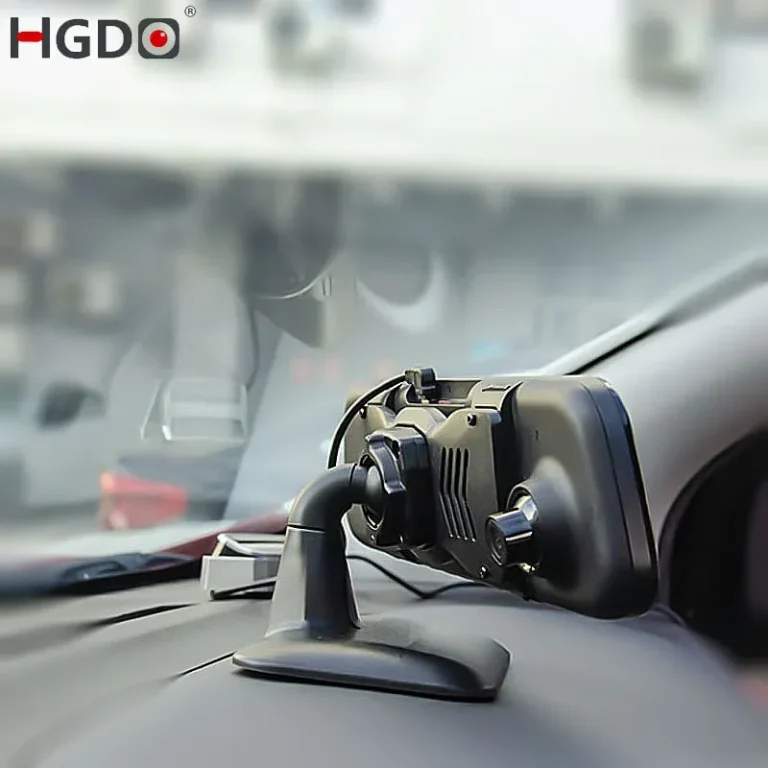
How to install a dash cam in a car: Best Guide
If you've ever watched a dash cam install video and thought "that looks easy," then opened your own glovebox and felt less sure, you're in the right place. Most people can figure out how to install a dash cam in a car on their first try, as long as they know which tools to grab, where the power cable should hide, and which fuse slot to use.
The trickiest part isn't mounting the camera. It's routing the cable cleanly and tapping power without nuking your car's battery. A clean cigarette-lighter install takes about 20 to 45 minutes.
A full hardwire job with parking mode runs 60 to 120 minutes. Below, we'll walk through the real-world process as of 2026, including the wiring choices that matter and the mistakes that turn a tidy install into a dangling-wire mess.
Quick Answer
How to install a dash cam in a car: mount the camera behind the rearview mirror. Route the power cable along the headliner and A-pillar. Plug it into the 12V socket or hardwire to the fuse box.
A cigarette-lighter install takes 20 to 45 minutes. A hardwired install with parking mode takes 60 to 120 minutes.
Dash Cam Install Basics: What You're Actually Working With
Before you touch a single cable, it helps to know what a dash cam install actually involves. You're really doing three jobs at once: mounting a small camera to the windshield, routing a power cable out of sight, and connecting that cable to a 12V power source. Skip any one of those and the install feels half-done.
A few terms you'll see throughout this guide:
- Dash cam: shorthand for dashboard camera, the small forward-facing camera mounted to your windshield.
- Hardwire kit: a small wiring harness that connects the dash cam directly to the fuse box, giving you parking mode and freeing up the 12V socket.
- Fuse tap (add-a-fuse): a low-profile adapter that slots into your fuse box so you can draw power without cutting factory wiring.
- Parking mode: a low-power standby that records motion or impacts while the car is off. Only works with a hardwired or OBD-II install.
- MicroSD card: the dash cam's storage. Endurance-rated cards last much longer than standard cards under constant writing.
Most modern dash cams as of 2026 use either a lithium-ion battery or a supercapacitor for short-term power. Supercapacitor models handle heat better and are preferred in hot climates or cars parked in direct sun.

Web (Bing) / ar.inspiredpencil.com (Web image (fair-use with source credit))
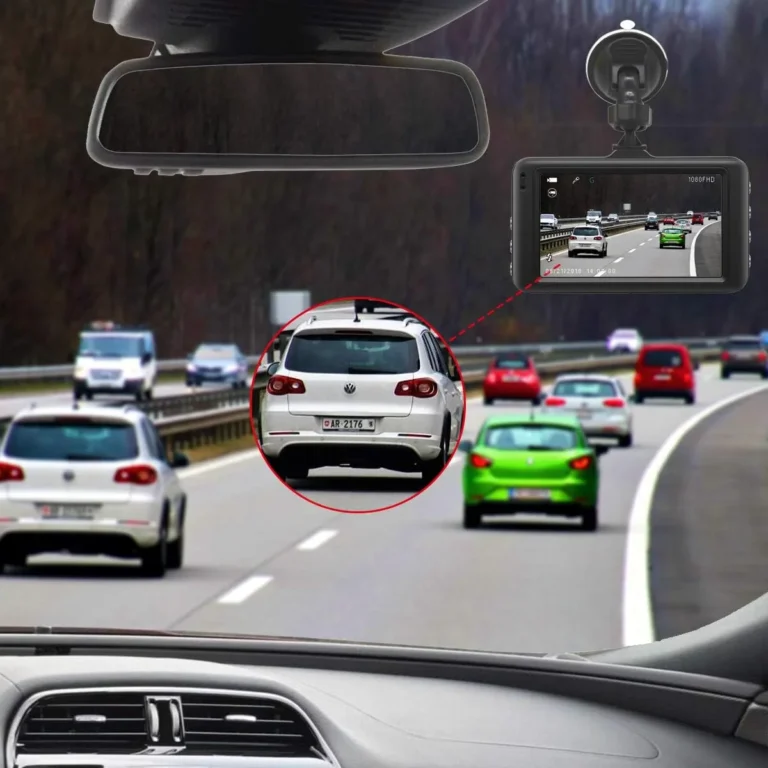
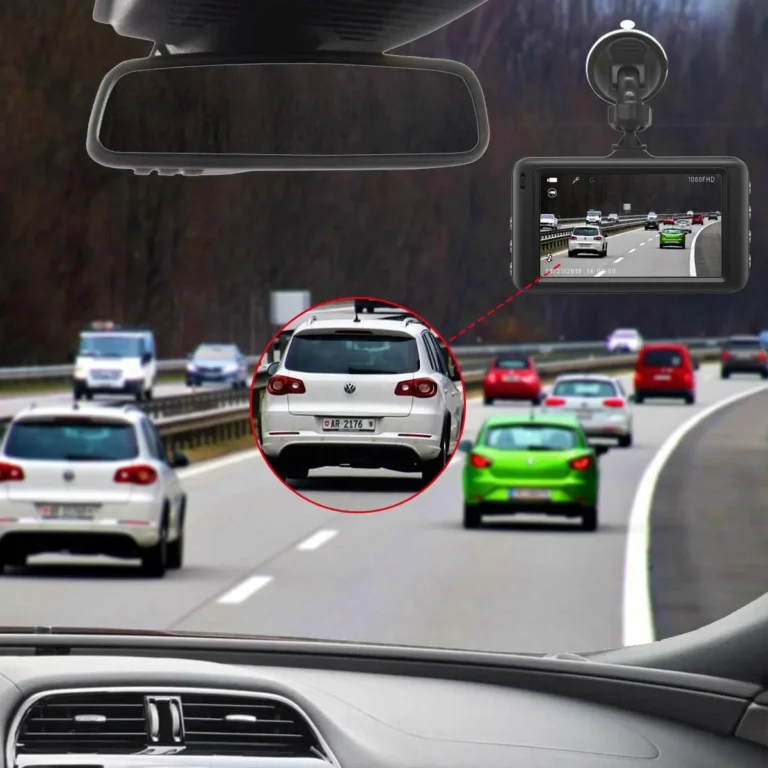
A clean install looks like this: the camera sits tucked just behind the rearview mirror, with no cable hanging across the glass. That's the goal. Everything below is the work it takes to get there.
Choosing Your Install Method: Cigarette Lighter, Hardwire, or OBD-II
You've got three realistic options for powering a dash cam. The right choice depends on whether you want parking mode, whether you care about freeing up your 12V socket, and how permanent you want the install to feel.
| Method | Install Time | Parking Mode | Frees 12V Socket | Difficulty |
|---|---|---|---|---|
| Cigarette lighter / 12V adapter | 20 to 45 min | No (engine must be on) | No | Easy |
| Hardwire kit to fuse box | 60 to 120 min | Yes | Yes | Moderate |
| OBD-II power cable | 25 to 40 min | Yes (some vehicles) | Yes | Easy to moderate |
A cigarette-lighter install is the fastest and most reversible option. Plug the adapter in, tuck the cable along the headliner, done. The downside is no parking mode and a power cable always hanging out of the socket.
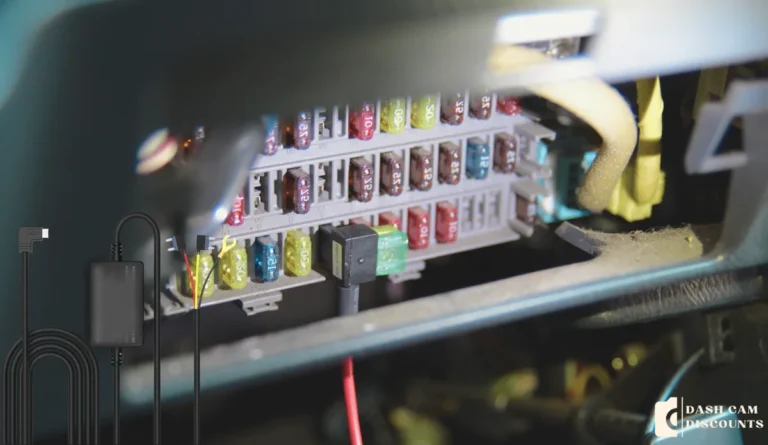
A hardwire install takes longer but unlocks parking mode and gives you a fully hidden cable run. The hardwire kit's black wire grounds to a chassis bolt, the red wire goes to a switched fuse, and the yellow wire goes to a constant fuse. That constant tap is what powers parking mode when the ignition is off.
OBD-II power cables sit in the middle. They plug into the diagnostic port under the dash and supply switched and constant power without touching the fuse box. The catch: some vehicles shut off the OBD-II port when the ignition is off, which kills parking mode.
Always check your owner's manual first.
If you only care about recording while driving, stick with the cigarette lighter. If you want full-time protection (parked-car hit-and-runs, vandalism, parking-lot dings), go hardwire.
Tools and Gear You'll Need Before You Start
Nothing exotic here. Most people already own 80% of this. Lay it out before you start so you're not climbing in and out of the car looking for a fuse puller halfway through.
- Dash cam (front, or front + rear bundle)
- MicroSD card, endurance-rated, 32GB to 512GB
- Mount: usually 3M VHB adhesive pad or suction cup, depending on the model
- Power cable: USB-C, micro-USB, or hardwire pigtail (varies by brand)
- Hardwire kit (only if hardwiring)
- Add-a-fuse taps (2, sized to your fuse box, usually mini or micro2)
- Fuse puller (often comes with the car, sometimes with the hardwire kit)
- Trim removal tool (plastic, not metal, to avoid scratching panels)
- 10mm socket or wrench for the ground bolt
- Isopropyl alcohol wipes for cleaning the windshield before mounting
- Zip ties for securing slack cable behind trim
- Multimeter (optional but helpful for identifying fuse types)
One thing worth flagging: cheap MicroSD cards die fast under dash cam workloads. Aggregate user reviews as of 2026 consistently report standard cards failing within 3 to 6 months under continuous loop recording. Endurance-rated cards (Samsung Pro Endurance, SanDisk High Endurance, or similar) typically last 3 to 5 times longer.
Spend the extra few dollars.
Where to Mount the Dash Cam (and Where to Never Put It)
Mount location matters more than most people realize. A bad mount position means footage that's partially blocked, a camera that vibrates at highway speed, or worse, a citation for obstructing your view.
The sweet spot is just behind the rearview mirror, slightly to the passenger's side if your car is left-hand drive. From this position, the camera sees the full road ahead while sitting out of the driver's direct line of sight. In a right-hand drive car, mirror that and shift slightly to the driver's side.
A few rules to keep in mind:
- Keep the lens inside the wiper's sweep zone. Wipers don't reach the very top corners of most windshields, and a lens outside that zone will be blurred or covered in rain.
- Make sure the lens is below the AS-1 line (the dotted black band at the top of the windshield). Mounting on or above that band can violate state windshield obstruction laws. The National Highway Traffic Safety Administration sets the federal baseline on windshield obstruction, though state laws vary.
- Don't mount on the dashboard. Adhesive mounts fail in heat, and reflections off the dash create glare in your footage.
- Avoid the airbag deployment zone. Check your owner's manual for the exact dashed line on your windshield that marks the airbag path. Mounting inside that zone can interfere with airbag deployment in a crash.
A clean mount position looks factory-installed: small, dark, tucked behind the mirror, with the lens peeking just below. If you can see the camera in your normal driving posture, it's mounted too low.
Step-by-Step: How to Install a Front Dash Cam
A front-only install is the simplest version of this job. Plan on 20 to 45 minutes if you're going the cigarette-lighter route, and closer to 60 minutes if you're hardwiring for the first time.
Prep the windshield and mount the camera
Wipe the mounting area with isopropyl alcohol and let it dry for a minute. The alcohol cuts the film that keeps the 3M VHB pad from sticking. Position the mount just behind the rearview mirror.
Press firmly for 30 seconds. The adhesive typically needs 24 hours to fully cure, so avoid yanking on it the first day.
Plug in and route the cable
Run the cable up from the camera, tuck it into the headliner gap, and follow it down the A-pillar. Most headliners have enough flex to press the cable into the gap with a trim tool. Don't force it.
If you meet resistance, pull back and find a softer section.
Connect power
If you're using the cigarette-lighter adapter, run the cable down to the socket and you're done. If you're hardwiring, jump ahead to the fuse box steps below before finalizing the cable run.
Format the SD card and test
Pop the MicroSD card into the camera. Use the camera's menu to format it (not your computer). This sets up the file system the way the dash cam expects.
Then start the car and confirm the camera powers on, records, and saves files.
Step-by-Step: How to Install a Front + Rear Dash Cam System
A dual-channel system adds a rear camera and a long extension cable. Plan on an extra 20 to 30 minutes compared to a front-only install. The rear camera is the part most people underestimate.
Mount the rear camera first
Mount the rear cam at the top center of the rear windshield, just below the defroster line if your car has one. Center placement keeps the footage symmetric. Make sure the lens is inside the wiper's sweep if your rear wiper runs intermittently.
Route the rear cable
Run the rear camera's extension cable along the headliner, down the C-pillar (the vertical pillar between the rear window and the rear door), and across to the A-pillar on the passenger side. Tuck the cable into the trim gaps the same way you did with the front power cable.
The most common mistake here is pinching the cable at the hatch or trunk hinge. If you drive a hatchback or SUV, leave a service loop of slack near the hinge so the cable flexes instead of breaking every time you open the tailgate.
Connect the rear cable to the front unit
The rear camera's extension cable plugs into the main front unit, usually via a small mini-USB or proprietary connector on the side. Most front units have a single rear-cam port. Plug it in before you finalize any cable routing, so you can confirm the rear camera actually powers on.
Test both channels
After everything's connected, start the car and verify both cameras are recording. The screen should show a split view or two separate feeds. Take a short drive and review the footage.
Check for vibration, glare, or upside-down rear-camera images (a common mistake fixed by rotating the mount).
Routing the Power Cable: Headliner, A-Pillar, and Fuse Box
This is the part that decides whether your install looks clean or amateur. The goal: zero visible cable between the camera and the power source.
Headliner routing
Start at the camera and push the cable into the gap between the headliner and the windshield. Use a plastic trim tool to gently press it in. Work your way toward the A-pillar.
Most headliners have just enough give to hide the cable without removing any trim.
A-pillar routing
Pull back the rubber weatherstrip along the A-pillar. Tuck the cable behind it, then press it into the gap between the pillar and the headliner. Important: route the cable down the passenger-side A-pillar, never the driver-side.
The driver-side A-pillar often houses a side curtain airbag. Cables routed there can interfere with airbag deployment in a crash.

Bing (Web (fair-use with source credit))
Down to the fuse box or kick panel
Continue routing the cable down behind the A-pillar trim, then across the kick panel (the plastic panel under the steering column) toward the fuse box. Most fuse boxes live under the dash on the driver's side or in the engine bay. Check your owner's manual for the exact location.
Avoid these routing mistakes
- Don't let the cable drape across any airbag logo on the trim panels.
- Don't pinch the cable under a seat rail or door weatherstrip.
- Don't route it near any moving parts like the steering column adjustment lever.
How to Hardwire a Dash Cam to Your Fuse Box
A hardwire kit converts your car's 12V system into a dash cam power source with no dangling wires and full parking mode. The kit has three wires: red (switched power), yellow (constant power), and black (ground).
Tools and parts checklist
- Hardwire kit (matched to your dash cam, usually 5V or 12V output)
- 2 add-a-fuse taps (correct size for your fuse box, usually mini or micro2)
- 10mm socket or wrench
- Fuse puller
- Trim removal tool
Identify the fuse box
Check your owner's manual for the exact fuse box location. Most cars have at least two: one under the hood and one inside the cabin. Use the interior fuse box for a dash cam install.
The engine bay fuse box is exposed to heat and moisture.
Remove a switched fuse and a constant fuse
Use the fuse puller to pull the existing fuse from the slot you've chosen for switched power. Test the slot with a multimeter: it should show 0V when the car is off and 12V+ when the ignition is on. Do the same for the constant slot, which should show 12V+ at all times.
Common switched fuse candidates: rear wiper, radio, or accessory sockets. Common constant candidates: dome light, horn, or hazard flashers. Pick something low-amperage, ideally under 15A.
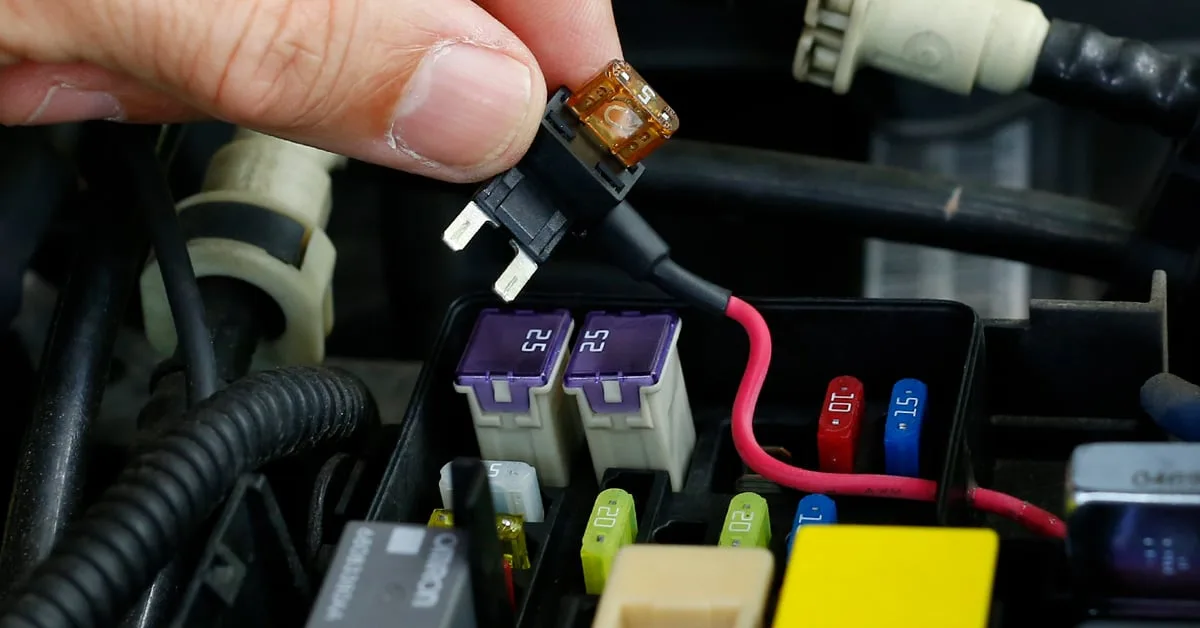
Install the add-a-fuse taps
Web (Bing) / crutchfield.ca (Web image (fair-use with source credit))
Slide the original fuse into the lower slot of the add-a-fuse. Slide a fresh fuse of the same amperage into the upper slot. Insert the add-a-fuse into the fuse box slot.
Repeat for the constant slot.
Connect the ground wire
Loosen a nearby chassis bolt (any unpainted metal bolt connected to the frame). Slide the hardwire kit's black ring terminal under it. Tighten the bolt back down.
That's your ground.
Set the voltage cutoff
Most hardwire kits have a small module with a voltage cutoff switch. This tells the dash cam to stop drawing power when your battery drops below a certain voltage, protecting you from a dead battery in the morning.
| Cutoff Setting | Battery Type | Behavior |
|---|---|---|
| 11.6V | Lead-acid (older cars) | Most aggressive cutoff, leaves enough juice to start |
| 12.0V | Standard lead-acid | Balanced default for most cars |
| 12.4V | AGM or lithium accessory | Conservative, recommended for deep-cycle batteries |
Pick the setting that matches your battery. If you're unsure, 12.0V is the safe default.
Picking the Right Fuse Slot (Switched vs. Constant)
This is where most first-timers get tripped up. The fuse slot you choose determines whether your dash cam works the way you expect.
Switched fuse (red wire)
A switched fuse only carries power when the ignition is on. Connect the dash cam's red wire here. The camera will turn on when you start the car and shut off when you turn the key.
This is how the camera knows when you're driving.
Constant fuse (yellow wire)
A constant fuse carries power at all times. Connect the dash cam's yellow wire here. The camera can use this source while parked for parking mode.
If you skip this connection, parking mode won't work.
Test before you button everything up
Turn the car on. The dash cam should power up. Turn the car off.
The dash cam should switch to parking mode (or shut off if you're not using parking mode). If the camera behaves backward, you've got your wires crossed: swap the red and yellow fuse taps.
Stay away from high-amperage fuses
Don't use a fuse slot rated above 15A. High-amperage circuits (like AC compressor or radiator fan) can spike and damage the dash cam's circuitry. Stick to low-draw accessories like the radio, dome light, or rear wiper.
A solid hardwire job looks like this: two add-a-fuses in the interior fuse box, a clean ground on a chassis bolt, and the voltage cutoff module tucked behind the kick panel trim. That's it. The dash cam turns on with the car, runs parking mode overnight, and shuts off before your battery dips too low.
Everything else is just tidy trim work.
Setting the Voltage Cutoff for Parking Mode
The voltage cutoff setting decides how low your car battery can drop before the dash cam stops drawing power. Get it wrong and you'll come back to a dead battery. Get it right and parking mode runs all week without issue.
Set the cutoff based on your battery chemistry. Standard flooded lead-acid batteries handle a 12.0V cutoff well. AGM batteries can go lower, around 11.8V.
If your car has a start-stop system or lithium accessory battery, bump the cutoff up to 12.2V or 12.4V to be safe. Most hardwire kits ship with a small switch or dip selector on the inline module. Pick your setting before you tuck the module behind the kick panel.
Mounting the Rear Camera Without Pinching the Cable
Rear camera cables fail more often than the cameras themselves. The failure point is almost always at a hinge: the trunk lid, the hatch, or the door gasket.
Leave a service loop. That's a few extra inches of slack at the hinge point so the cable flexes every time the hatch opens. Run the cable through the rubber boot that protects the factory wiring harness, not over it.
Tuck the cable into the headliner with a trim tool, then along the C-pillar and across to the A-pillar the same way you routed the front power cable.
Installing the MicroSD Card and First-Time Setup
Slide the MicroSD card into the camera with the label facing up (the slot direction varies by model). Don't force it. A wrong-direction card won't click in.
Format it inside the camera, not on your computer. The camera's format function sets up the file system and write cycles the way the hardware expects. Format again every 60 to 90 days to keep the card healthy.
Format immediately if you see "card error" on screen or if the camera stops recording mid-drive.
Pairing Your Dash Cam With the Smartphone App
Most dash cams as of 2026 pair over Wi-Fi, not Bluetooth. Download the brand's app, plug in the camera, and look for a Wi-Fi network starting with the dash cam's model number.
Connect your phone to that network, open the app, and live-view your footage. The app also handles firmware updates, parking mode toggles, and G-sensor sensitivity. Run a firmware update before you finalize the install.
Newer firmware often fixes Wi-Fi dropouts and parking mode bugs.
Testing the Install: Recording, GPS, and Parking Mode
Drive for 10 minutes after the install. Pull the footage and check four things. First, video quality.
Look for blurry frames, dashboard reflections, or sky overexposure. Second, audio. Confirm it's recording, and disable it if you're in a two-party consent state.
Third, GPS lock. Drive until the app shows your speed and route logged. Fourth, parking mode.
Turn the car off, walk in front of the camera, and confirm it wakes up and saves a clip.
If any of those fail, troubleshoot before you button up the trim. Re-checking after the panels are snapped back in is a pain.
Dash Cam Installation Mistakes That Cause Real Problems
Mount fall-offs trace back to dirty glass. Footage glare traces back to dashboard reflection. Battery drains trace back to wrong fuse taps.
Every common mistake has a quick diagnostic and fix.
| Symptom | Likely Cause | Fix |
|---|---|---|
| Camera falls off after a day | Dust or oil on windshield | Clean with isopropyl alcohol, press mount 30 sec, wait 24 hr |
| Footage is dark at night | Cheap sensor, no HDR | Enable WDR/HDR, or upgrade to Sony STARVIS sensor |
| Battery dead in the morning | Wrong fuse, no cutoff | Move yellow wire to a constant fuse, set 12.0V cutoff |
| Rear cam image is upside down | Mounted upside down | Rotate the rear camera 180° in its mount |
| Cable visible across windshield | Skipped headliner routing | Tuck into headliner gap with a trim tool |
Blocking Airbags and Windshield Obstruction Laws to Know
Airbags deploy with serious force. Anything routed along the airbag path can become a projectile. Stick to the passenger-side A-pillar and avoid driver-side routing.
Windshield obstruction laws vary by state. Most allow mounting within a 5 to 7 inch square in the upper center or upper passenger area. Some states ban any suction-cup mounts.
Check your state's DMV site before you commit to a mount location. The National Highway Traffic Safety Administration publishes federal guidance on windshield equipment, though state rules take precedence.
Keeping Your Dash Cam Running Long-Term
Format the SD card every 60 to 90 days. Wipe the lens with a microfiber cloth monthly. Check the adhesive mount every few months, especially in hot climates.
Update the firmware when the app prompts you. Replace the SD card every 2 to 3 years, even if it seems fine. Endurance cards slow down before they fail outright, and a slow card means dropped frames at the worst possible moment.
Frequently Asked Questions
How long does a dash cam install take?
A cigarette-lighter install takes 20 to 45 minutes. A full hardwire with parking mode takes 60 to 120 minutes for most first-timers.
Will a dash cam drain my car battery?
Only if parking mode is hardwired without a voltage cutoff. With a 12.0V cutoff on a healthy battery, daily draws stay under 0.3A and your car starts every morning.
Do I need to hardwire, or is the cigarette lighter plug in fine?
Cigarette lighter is fine for basic recording while driving. Hardwire only if you want parking mode or a hidden cable run.
Can I install a dash cam myself, or do I need a professional?
Most people can do a cigarette-lighter install without any tools. Hardwiring requires comfort with fuse boxes and trim removal. If you're unsure, a car audio shop can hardwire for $75 to $150.
Is it legal to record audio with a dash cam?
In two-party consent states (California, Florida, Illinois, Maryland, Massachusetts, New Hampshire, Pennsylvania, Washington, Montana), recording in-car audio without consent is illegal. Disable audio recording if you drive passengers in those states.