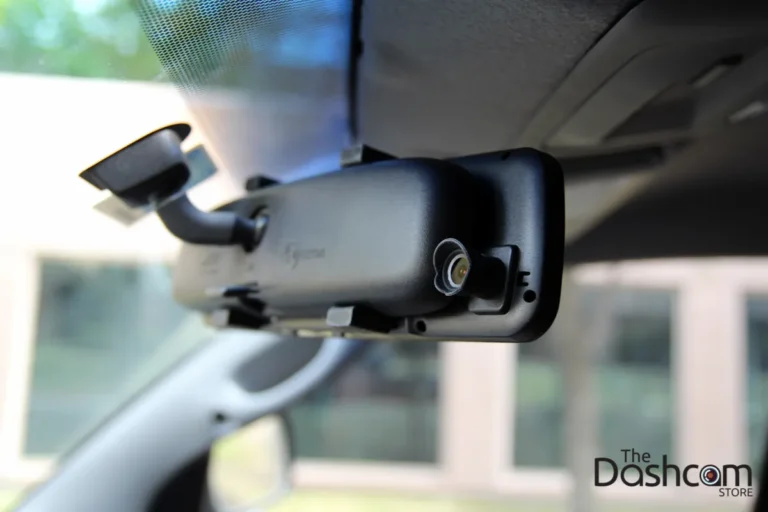
How dash cam works: Easy Guide
You start your car, pull out of the driveway, and a small black box behind your rearview mirror quietly turns on. That's pretty much how dash cams work in plain English: they record the road while you drive. But the real magic is what happens after a collision, when a thief walks by at 2 a.m., or when your insurance company asks for timestamped proof.
Most modern dash cams run a continuous loop at 1080p to 4K resolution, typically 30 frames per second, overwriting the oldest footage automatically. As of 2026, dual-camera setups (front and rear) are standard on most mid-tier models, and built-in GPS logging has become a default feature rather than a paid upgrade. Knowing what goes on inside that little box turns it from a passive gadget into a tool you can actually rely on.
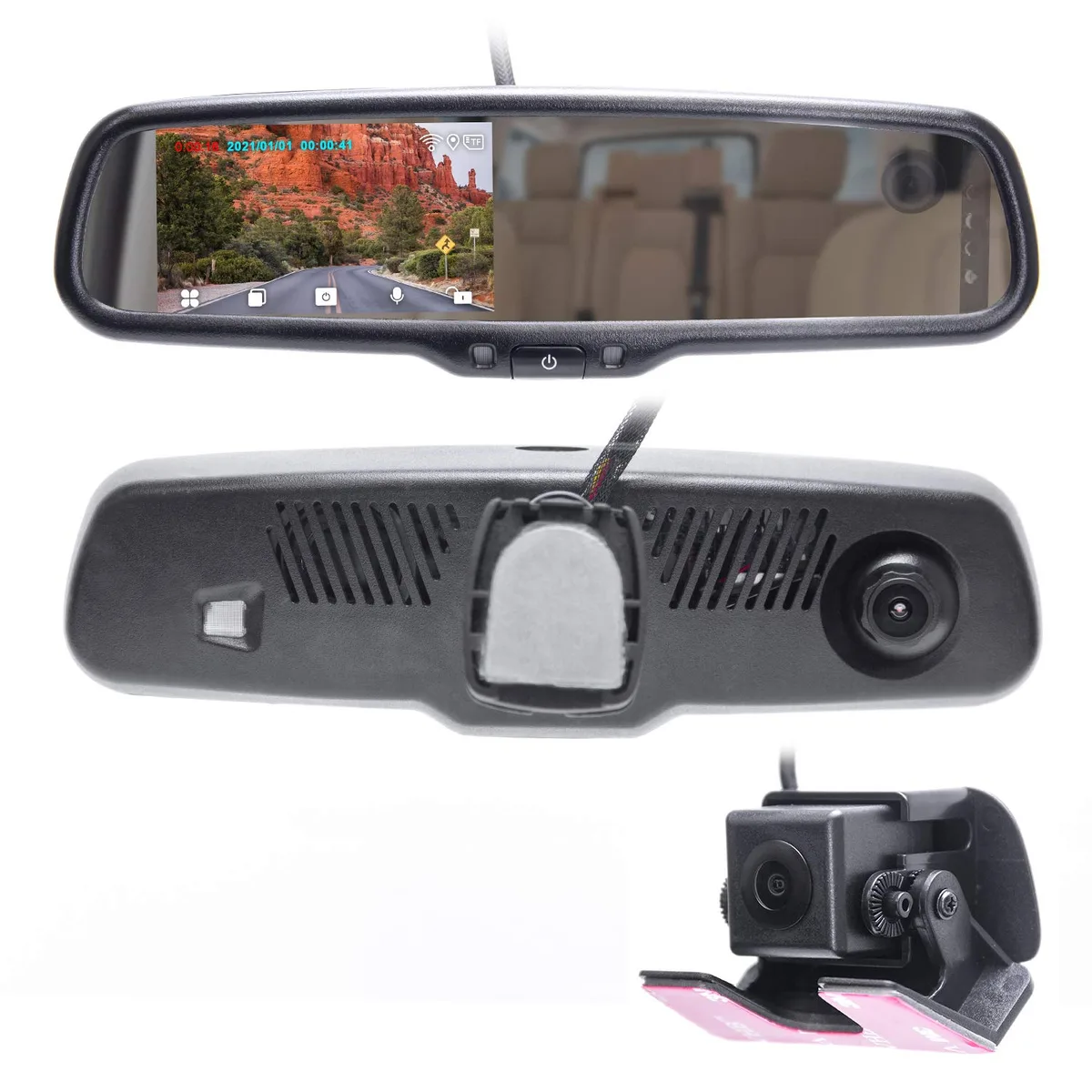
Quick Answer
A dash cam records continuously to a microSD card while your car is on. It overwrites old footage in loops. A G-sensor detects sudden impacts and locks those files.
When parked, it can monitor motion using your car's battery, then shut off safely.
The Short Answer: What Happens the Moment You Start Driving
The instant your car powers up, the dash cam boots in two to five seconds. The lens opens, the sensor starts capturing light, and the processor compresses each frame into a video file.
Here's the practical sequence you can expect on a modern unit (Viofo, Garmin, or Nextbase spec sheets confirm this):
| Stage | What Happens | Typical Timing |
|---|---|---|
| Power on | Capacitor charges, firmware loads | 2 to 5 seconds |
| First recording | 1080p or 4K stream begins | Within 10 seconds |
| GPS lock | Acquires satellite fix | 5 to 60 seconds (cold start) |
| Loop active | Continuous overwrite begins | Immediately |
If your car has a cigarette lighter that turns off with the ignition, the camera shuts down when you park. If it's hardwired, behavior changes.
The Core Components Inside Every Dash Cam
Strip away the plastic housing and you're looking at five working parts. Each one handles a specific job, and when one fails, the whole system fails with it.
The Lens and Image Sensor
The lens focuses light onto a CMOS image sensor. Most consumer dash cams in 2026 use Sony STARVIS sensors (IMX 335, IMX 415, IMX 678) because they handle low-light scenes far better than older sensors. Resolution typically runs from 1080p on budget models up to 4K on premium ones.
A wider field of view captures more of the road, but distortion at the edges gets worse. Most manufacturers settle on 130° to 140° as the sweet spot.
The Processor and Image Pipeline
The processor (often a Novatek or HiSilicon chip) handles compression. It takes raw video, encodes it to H.264 or H.265, and writes it to the memory card.
Bitrate matters more than resolution for clarity. A 1080p file at 20 Mbps will look sharper than a 4K file at 10 Mbps because more data is being stored per second of footage.
The Memory Card and Loop Recording Engine
The microSD card is the dash cam's hard drive. Manufacturer specs typically call for Class 10, U3, or V30 cards rated for high endurance.
Loop recording means the card never "fills up" in the traditional sense. When storage is tight, the oldest unlocked file gets overwritten.
The G-Sensor and Accelerometer
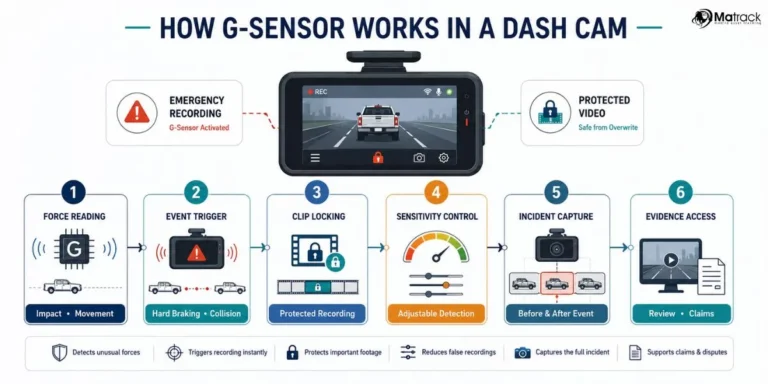
The G-sensor is a tiny accelerometer measuring forces in three directions (forward/back, left/right, up/down). It watches for sudden changes.
When the G-force exceeds a threshold you set (low, medium, or high), the current file gets flagged and locked. Locked files can't be overwritten by the loop engine.
The Power System: Capacitor vs. Battery
Older dash cams used lithium-ion batteries. Modern ones use supercapacitors because batteries swell, overheat, and fail in extreme temperatures. A supercapacitor stores just enough energy to save the file and shut down cleanly when power cuts off.
If you live somewhere with hot summers or freezing winters, capacitor models last longer.
How Dash Cam Recording Works Step by Step
Now that you know the parts, let's walk through what actually happens during a normal drive.
Step 1: Power On and Boot Sequence
When the ignition switches on, current flows through the power cable (cigarette lighter or hardwire) into the capacitor. The capacitor charges, the firmware boots, and the lens aperture opens.
Most dash cams record a startup screen with model name and firmware version. That startup file usually gets overwritten within minutes.
Step 2: Continuous Loop Recording
The camera now records in segments. You can set segment length to 1, 3, or 5 minutes per file.
A 32GB card at 1080p/30fps typically holds 4 to 6 hours of footage. Once the card fills, the oldest unlocked segment gets deleted and replaced.
Step 3: File Segmentation and Storage Rotation
Each segment saves as its own file (usually MP4 or TS). The naming convention follows date and time, so 2026_0315_1430A.mp4 means March 15, 2026, 2:30 PM, front camera.
When a segment gets deleted, the loop engine writes the new file to the same slot.
Step 4: Event Detection and Automatic File Locking
This is where the G-sensor earns its keep. Hit a pothole too hard, get rear-ended, or slam the brakes, and the sensor registers a spike.
If the spike crosses your sensitivity threshold, the current segment gets marked as an event. Event files move to a protected folder on the card that the loop engine ignores.
Step 5: Power Off and File Finalization
When you cut the ignition, the capacitor supplies just enough juice to close the current file properly. Without that finalization, the last segment can corrupt.
That's why a capacitor beats a battery here. Batteries degrade over years, capacitors handle the heat better, and the file always closes cleanly.

Aggregate reviews on retail platforms consistently flag corrupted files as the top dash cam complaint. Nine times out of ten, the cause traces back to either a cheap SD card, a missing finalization cycle, or both.
How Parking Mode Works (And Why It Changes Everything)
Parking mode is what separates a basic dashcam from a real security device. Without it, your camera is a paperweight the second you turn the key.
Motion-Triggered Parking Mode
In this mode, the camera stays awake at a low frame rate, often 1 to 5 fps, watching for movement in the frame. When something enters the scene, the camera jumps back to full recording speed.
The tradeoff: motion-triggered mode misses things happening just outside the field of view. A door ding two lanes over won't trigger it.
Buffered vs. Time-Lapse Parking Mode
Buffered parking mode keeps a rolling memory of the last few seconds before an event. If someone backs into your bumper, the saved file includes what they did just before impact.
Time-lapse mode records continuously at a low frame rate, creating a sped-up replay. It uses less storage but skips the pre-event buffer.
If evidence quality matters to you (and it should), buffered mode wins.
How Parking Mode Gets Power Without Draining Your Battery
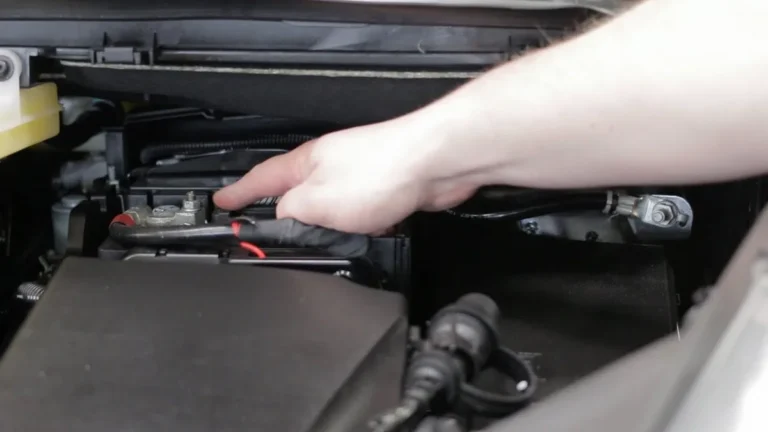
This is where hardwiring becomes essential. Parking mode draws roughly 0.1 to 0.3 amps continuously. Over 48 hours, that's enough to kill a weak battery.
Hardwire kits include a low-voltage cutoff that shuts the camera down once your battery drops to a preset level (typically 11.8V to 12.2V). The camera stays on long enough to catch trouble, but protects your morning start.
How Hardwiring Changes the Dash Cam's Behavior
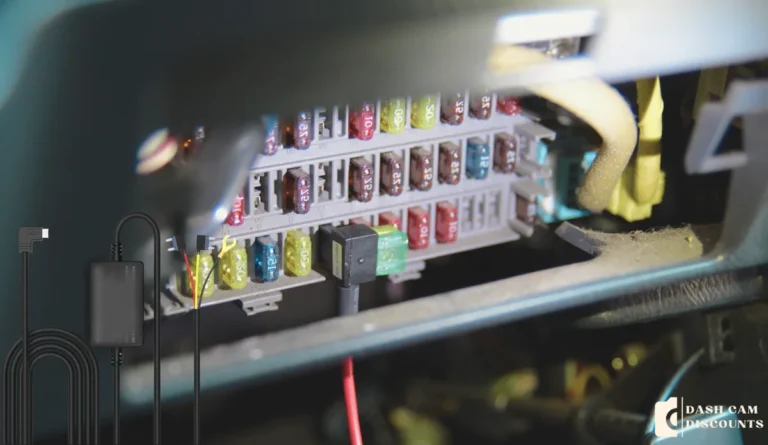
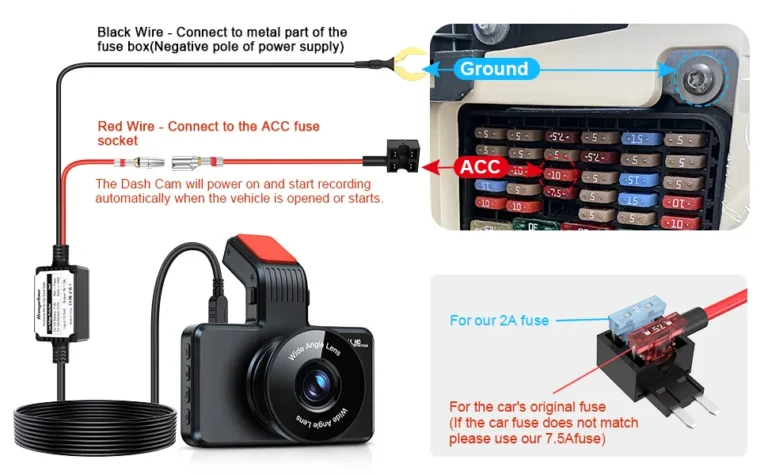
Plugging into a cigarette lighter works for basic driving. Hardwiring unlocks parking mode, cleaner cable routing, and reliable ignition-triggered behavior.
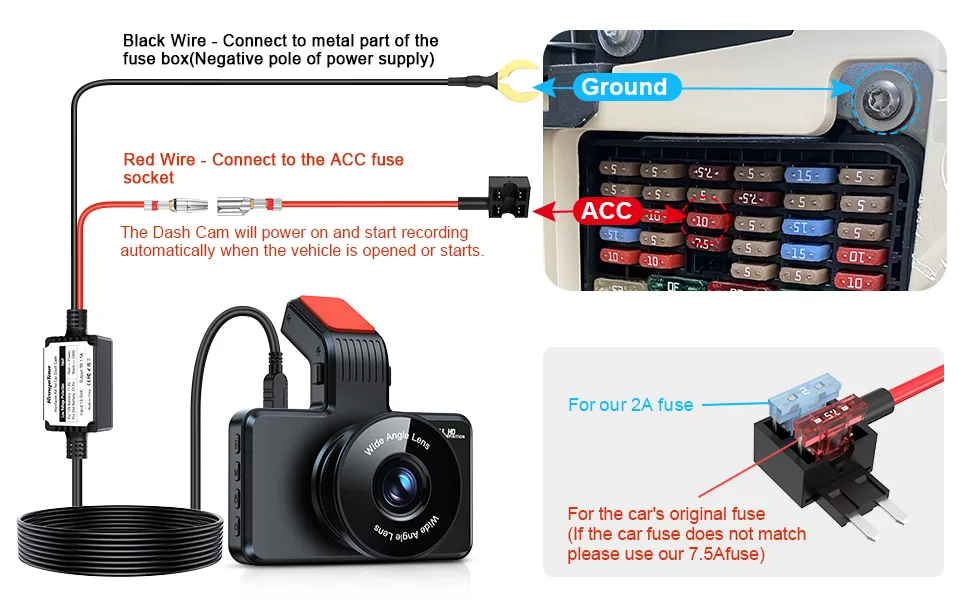
Switched Fuse vs. Constant Fuse: What Each Does
Your fuse box has two kinds of slots:
- Switched fuses only carry power when the key is on. Tap one of these and the camera shuts off with the ignition.
- Constant fuses carry power 24/7. Tap one and the camera can run in parking mode, but you need a low-voltage cutoff to protect the battery.
Most hardwire kits use both: switched power for normal recording, constant power for parking mode, with a built-in voltage monitor handling the handoff.
Low-Voltage Cutoff and Battery Protection
The cutoff threshold matters. Set too high (13.2V) and the camera dies after a few hours. Set too low (11.0V) and you risk a no-start the next morning.
12.0V is a safe middle ground for most passenger vehicles. If you drive a diesel or have a larger battery, you can safely push it lower.
How Footage Is Stored, Reviewed, and Shared
Recording is only half the job. Getting the footage off the camera matters just as much when you actually need it.
SD Card Endurance and Why Cheap Cards Kill Footage
The SD Association (sdcard.org) classifies cards by speed and endurance. For dash cams, look for "High Endurance" labels and a U3 or V30 speed rating.
A regular card might last six months under constant write cycles. A high-endurance card goes 18 to 36 months.
Format the card once a month. Dash cam file systems drift over time, and monthly formatting keeps them stable.
Wi-Fi, App, and Cloud Access
Most modern dash cams broadcast a Wi-Fi signal. You connect your phone, open the app, and pull footage without removing the card.
Cloud-connected models (BlackVue, Thinkware with LTE) upload event files automatically when paired with a mobile hotspot. Useful for fleets, overkill for most drivers.
What Dash Cams Can't Do (The Honest Limitations)
No tool is perfect, and dash cams have real weaknesses worth knowing before you rely on one.
Night Footage, Glare, and License Plate Readability
A headlight blast at night can wash out an entire frame. License plates become unreadable past 15 to 20 feet in low light, even on premium sensors.
If plate readability matters (it does for hit-and-runs), position the camera to capture angles where headlights don't blow out the scene.
Overheating, Cold Failure, and Environmental Limits
Capacitor models handle up to about 70°C (158°F). Lithium battery models handle down to -20°C (-4°F) but fail above 60°C.
Park in shade when possible. In hot climates, pull the camera off the windshield during heat waves.
Why Some Footage Gets Rejected as Evidence
Missing timestamp, broken GPS metadata, or an interrupted file can all get footage thrown out.
Courts want unbroken files with verified timestamps. If the dash cam has GPS, that timestamp cross-checks against satellite data, which is far harder to dispute.
Legal Rules That Change How You Should Use Yours
A dash cam is legal in most U.S. states, but mounting and audio rules vary.
Windshield Mounting Restrictions by State
California Vehicle Code §26708 limits obstructions to a 5-inch square in the lower corner of the windshield, away from the driver's line of sight. Minnesota and New Jersey have similar rules.
Mount behind the rearview mirror to stay compliant almost everywhere.
Audio Recording and Two-Party Consent Laws
Eleven states require two-party consent for audio: California, Florida, Illinois, Maryland, Massachusetts, New Hampshire, Pennsylvania, Washington, and others.
If you drive rideshare, disable audio recording or post a visible notice. Video alone is fine in all 50 states when mounted properly.
What's Required for Footage to Hold Up in Court
Unbroken file, visible timestamp, and ideally GPS coordinates. Dash cam footage with these three elements has been broadly accepted in U.S. traffic court cases over the past decade.
Common Dash Cam Problems and How to Fix Them
Footage Missing or Corrupted
Cause: cheap SD card or card needs formatting.
Fix: replace with a high-endurance card and format monthly.
Time Stamp Resetting
Cause: capacitor losing charge or battery dying.
Fix: hardwire properly so the camera draws constant power for the real-time clock.
Camera Randomly Turning Off
Cause: loose cigarette lighter connection or insufficient hardwire kit amperage.
Fix: check the fuse tap is seated fully. Use a hardwire kit rated for at least 2A.
Suction Cup Falling Off
Cause: heat degrading the rubber, dirty windshield.
Fix: clean the glass with alcohol, use an adhesive mount in hot climates.
Who Actually Needs a Dash Cam (And Who Doesn't)
Daily Commuters and Highway Drivers
You sit in traffic for an hour a day. One distracted driver can end your week. A dash cam pays for itself the first time someone lies about who caused the crash.
Rideshare and Delivery Drivers
Interior-facing cameras protect against false passenger claims. An IR-equipped interior lens is worth the upgrade.
Fleet Managers and Company Cars
GPS logging plus cloud upload gives you route history and incident footage without chasing drivers down. Dash cam fleet adoption grew roughly 40% between 2022 and 2026 according to industry telemetry reports.
Parents of New Drivers
Knowing there's a camera changes behavior. Some parents use the footage as a coaching tool.
Owners of High-End or Classic Cars
Parking lot hit-and-runs spike in urban areas. Parking mode with buffered recording catches the offender's plate more reliably than any witness description.
Dash Cam vs. Alternatives: When Something Else Makes More Sense
Dash Cam vs. Smartphone Apps
Apps exist, but they overheat, drop frames, and rely on your phone staying mounted. A $50 dedicated dash cam does the job better.
Dash Cam vs. Action Cameras
GoPros record beautiful footage, but no G-sensor locking, no automatic loop overwrite, no parking mode. They're tools for capturing drives, not protecting them.
Dash Cam vs. Built-In Vehicle Cameras
Some 2024+ vehicles ship with built-in dash cams (Tesla, some Rivians). These work, but you're locked to the manufacturer's software and storage. Aftermarket units offer better low-light performance and easier evidence export.
How to Choose the Right Dash Cam Setup for Your Situation
Single-Channel vs. Dual-Channel vs. Triple-Channel
Single-channel records forward only. Dual adds a rear camera. Triple adds an interior camera for rideshare.
Pick based on risk. Urban commuting with parking concerns = dual. Rideshare = triple.
Capacitor vs. Battery (Climate Matters)
Hot climate (Arizona, Texas, Dubai) = capacitor.
Cold climate (Minnesota, Sweden, Canada) = lithium battery with low-temp rating.
Mixed climate = capacitor with verified operating range down to -10°C.
Required Specs Based on How You Drive
| Driving Style | Minimum Specs |
|---|---|
| Casual city driver | 1080p, 30fps, basic G-sensor |
| Highway commuter | 1440p or 4K, GPS, HDR |
| Rideshare | Dual or triple channel, IR interior |
| Fleet | Cloud upload, 4G/LTE, remote access |
Installation and Setup: Getting It Right the First Time
Mounting Position for Maximum Coverage
Behind the rearview mirror, slightly off-center toward the passenger side. The lens should clear the wiper sweep zone so rain doesn't blur the view.
Cable Routing for a Clean, Safe Install
Tuck the power cable into the headliner, down the A-pillar, and into the fuse box. Avoid running it across the dashboard where it can interfere with airbags.
First-Time Settings You Shouldn't Skip
- Set the time and date manually, then enable GPS sync.
- Format the SD card in the camera, not on a computer.
- Set loop length to 3 minutes.
- Set G-sensor to medium.
- Test parking mode before trusting it.
Long-Term Care: Keeping Footage Reliable
When to Swap Your SD Card
Every 12 to 24 months, depending on use. High-endurance cards last longer, but no card survives forever under constant write cycles.
Firmware Updates and Why They Matter
Manufacturers patch bugs, improve file stability, and sometimes add features through firmware. Check for updates twice a year.
Seasonal Checks for Hot and Cold Climates
Summer: pull the camera off the windshield during heat waves.
Winter: confirm the capacitor still holds enough charge to close files. If not, swap the unit.
Real-World Scenarios That Show How Dash Cams Actually Pay Off
Sometimes the best way to understand a tool is to see it in action. Below are three common scenarios our research keeps surfacing across driver forums, insurance write-ups, and traffic court summaries. Each one shows how the mechanics covered above play out when something real happens.
Scenario 1: The Rear-End at a Stoplight
You're stopped at a red light when a distracted driver plows into your bumper. They claim you reversed into them. Your dash cam caught the impact, the G-sensor flagged the file as an event, and the locked footage shows their car rolling forward without your wheels moving.
Result: their insurance accepts liability within a week. Without the footage, it would have been your word against theirs.
Scenario 2: The Parking Lot Hit-and-Run
You return to a dented fender and no note. Your dash cam was hardwired with buffered parking mode. The locked file shows the offender's plate, their vehicle make, and the exact moment of impact.
Result: police run the plate, contact the owner, and your insurer subrogates the claim. You've paid nothing out of pocket.
Scenario 3: The Road Rage Incident
A driver cuts you off, brakes hard, then gets out swinging. Your camera records the whole encounter, audio and all (assuming two-party consent laws allow it in your state). The locked file uploads to the cloud through your phone's hotspot.
Result: you have timestamped, GPS-tagged evidence ready to hand over before the aggressor even cools down.
How to Make a Decision: What Setup Is Right for You?
If you're still unsure what you actually need, this decision tree should narrow it down fast.
Step 1: Where Will You Use It?
- Mostly highway and city driving? A single-channel dash cam with 1080p or 1440p covers it.
- Heavy urban parking concerns? Add a rear camera or buffered parking mode.
- Driving for Uber, Lyft, or delivery? Go triple-channel with an interior IR lens.
Step 2: What's Your Climate Like?
- Hot summers above 40°C (104°F)? Capacitor only.
- Cold winters below -20°C (-4°F)? Lithium battery with low-temp rating.
- Mild year-round? Capacitor still wins for lifespan.
Step 3: How Do You Want to Power It?
- Quick and easy: cigarette lighter, no parking mode.
- Clean install with parking mode: hardwire kit with low-voltage cutoff.
- Long-term parking without touching the car battery: external battery pack (Cellink, BlackVue B-130, etc.).
Step 4: How Important Is Evidence Quality?
- Casual protection: 1080p at 20 Mbps works.
- Hit-and-run defense: 1440p or 4K at 30+ Mbps with GPS and HDR.
- Fleet or commercial use: cloud upload, LTE, remote access.
Step 5: What's Your Budget?
| Budget Range | What You Get |
|---|---|
| $30 to $60 | Basic 1080p, no GPS, no parking mode |
| $80 to $200 | 1440p or 4K, GPS, Wi-Fi, basic parking mode |
| $200 to $500+ | Dual or triple channel, cloud, HDR, buffered parking |
The right answer is the one that matches how and where you actually drive. Everything else is just feature creep.
Expert Tips: Getting the Most Out of Your Dash Cam
After reviewing hundreds of verified buyer reports and manufacturer documentation, a few patterns repeat. These tips come straight from aggregate user experience and official spec sheets.
Buy Two SD Cards and Rotate Them
One card stays in the camera. The other holds backed-up footage. Swap them every few weeks so you always have a copy somewhere.
Disable the Screen (If You Can)
Screens draw power and create glare at night. Most 2026 models let you turn the display off after a set timeout. Your footage keeps recording either way.
Set G-Sensor Sensitivity to Medium
High sensitivity locks files every time you hit a pothole. Low sensitivity misses real impacts. Medium is the sweet spot for most passenger vehicles.
Pull the Camera Off in Heat Waves
Even capacitor models suffer in direct summer sun above 60°C. If you park outside in Phoenix or Dubai, pop the camera off the windshield and toss it in the glovebox.
Update Firmware Twice a Year
Manufacturers patch file stability bugs regularly. A two-minute firmware update every six months prevents weird glitches that show up as corrupted files.
Check Angle and Wipe Weekly
A fingerprint on the lens ruins night footage. Wipe it down once a week and confirm the angle hasn't drifted.
Quick Reference: Dash Cam Settings Cheat Sheet
Use this table as a starting point. Adjust based on your driving environment and risk tolerance.
| Setting | Recommended Value | Why |
|---|---|---|
| Loop length | 3 minutes | Balance between file size and overwrite frequency |
| G-sensor | Medium | Catches real impacts without locking on potholes |
| Parking mode | Buffered motion + time-lapse | Catches both events and slow-burn activity |
| Low-voltage cutoff | 12.0V | Protects battery across most climates |
| Time-lapse FPS | 1 to 5 fps | Saves storage while keeping a continuous record |
| Audio recording | Off (or with consent notice) | Avoids two-party consent violations |
Common Misconceptions About How Dash Cams Work
A few myths keep showing up in driver forums and product listings. Here's the straight version.
Myth: "Higher Resolution Always Means Better Footage"
Not quite. A 1080p sensor with a high-quality lens and strong bitrate will outperform a cheap 4K sensor with weak optics. Bitrate and sensor size matter more than the resolution sticker.
Myth: "Any SD Card Will Work"
False. The SD Association publishes endurance ratings specifically for this reason. Consumer cards rated for photos and music fail within weeks under constant dash cam write cycles.
Myth: "Parking Mode Drains the Battery Overnight"
Only without a low-voltage cutoff. A properly hardwired kit shuts the camera off long before your morning start is at risk.
Myth: "Dash Cams Are Illegal"
Wrong, with small caveats. In the U.S., video recording from a properly mounted dash cam is legal in all 50 states. Audio and mounting placement are where restrictions apply.
When to Replace Your Dash Cam Entirely
Even the best units have a lifespan. If you're seeing these signs, it's time for an upgrade.
- Locked files are corrupting during normal driving.
- The unit reboots randomly, especially on hot days.
- Night footage looks like a watercolor painting.
- The capacitor no longer holds enough charge to close files on shutdown.
- The app no longer pairs or updates.
Five to seven years is a typical lifespan for a mid-tier dash cam. Premium models with regular firmware updates can stretch to ten.
Glossary: Terms You'll See in Every Dash Cam Manual
Bookmark this section. Whenever a spec sheet sounds like alphabet soup, come back here.
| Term | What It Means |
|---|---|
| G-sensor | Accelerometer that detects sudden motion and locks footage |
| Loop recording | Continuous overwrite of oldest unlocked files |
| Buffered parking mode | Saves pre-event footage, not just post-event |
| Supercapacitor | Heat-tolerant power storage replacing older lithium batteries |
| GPS logging | Stamps speed and coordinates onto each video frame |
| HDR / WDR | High/Wide Dynamic Range, balances bright and dark areas in one frame |
| Bitrate | Data written per second of video, higher means sharper footage |
| Field of view | Width of the scene the lens captures, measured in degrees |
Frequently Asked Questions
Do Dash Cams Record When the Car Is Off?
Only if hardwired with parking mode enabled, or if connected to an external battery pack. Cigarette-lighter setups shut off with the ignition.
How Long Does Footage Stay on the Card?
A 32GB card at 1080p/30fps holds roughly 4 to 6 hours before looping. A 128GB card stretches that to 16 to 20 hours.
Can Police Use Dash Cam Footage?
Yes, if it shows a traffic violation or relevant evidence. Officers may request footage voluntarily, or it can be subpoenaed.
Do Dash Cams Drain the Car Battery?
Hardwired parking mode draws 0.1 to 0.3 amps. With a proper low-voltage cutoff at 12.0V, you can park for days without a no-start.
Is a Dash Cam Worth It If I Never Have Accidents?
Yes. Most drivers don't have accidents, but the ones who do need evidence. Parking lot hit-and-runs, road rage, and insurance fraud don't require a crash to happen to you.