How to jump start a power supply: Easy guide
A power supply won't spin up on its own. It needs a signal. That signal normally comes from your motherboard, and if you don't have one connected, your PSU just sits there.
So learning how to jump start a power supply means giving it that "turn on" command by hand, usually by bridging a single green wire to ground on the 24-pin connector.
Most modern ATX power supplies follow the Intel ATX12V specification. That spec is what defines the green PS_ON pin, the voltage tolerances (±5% on the +12V, +5V, and +3.3V rails), and the standby rail. Once you know those rules, jump-starting any ATX PSU is the same basic trick.
As of 2026, the process hasn't changed, even with the newer ATX 3.x revisions, so the steps below still hold.
Quick Answer
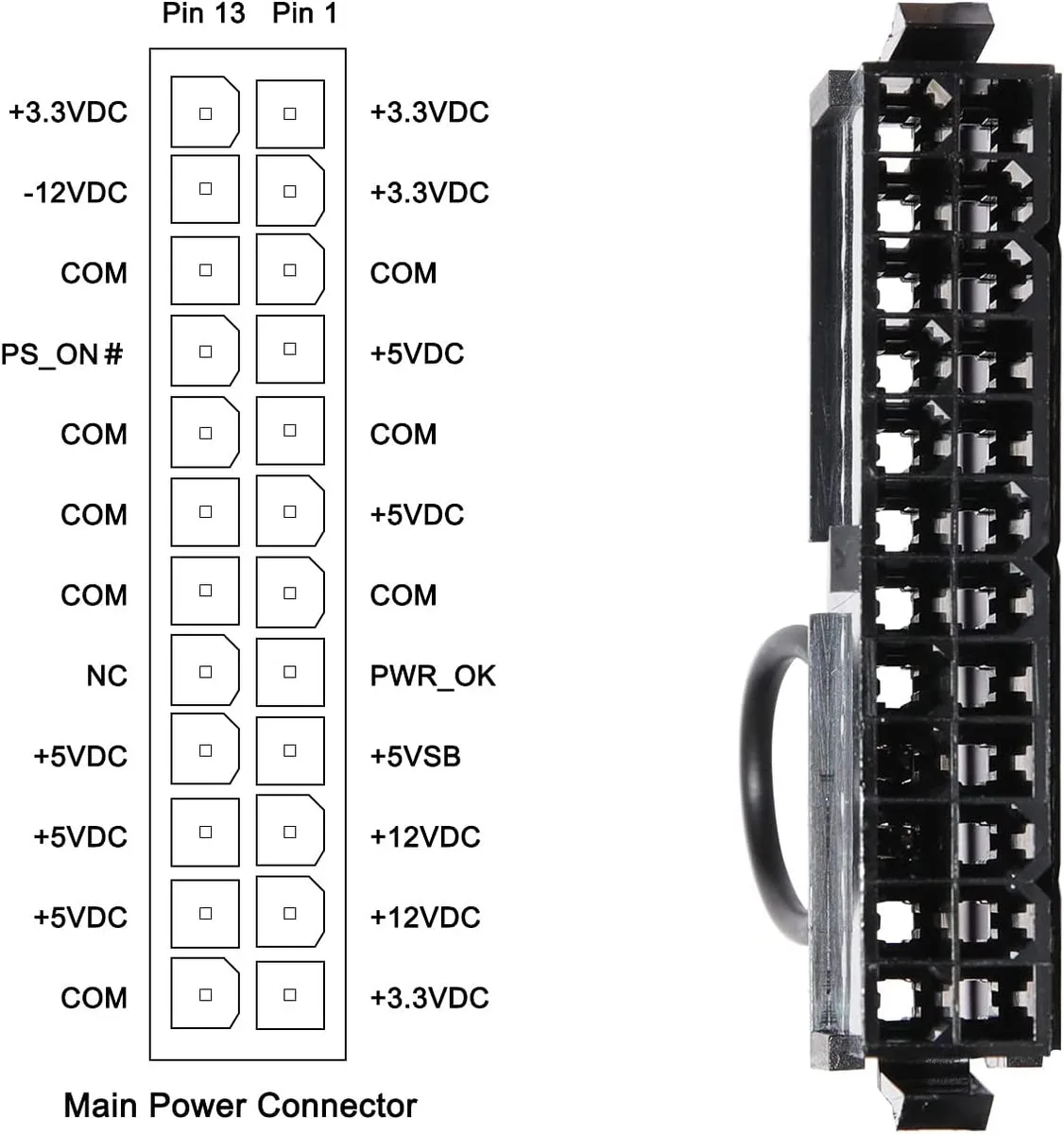
To jump start a power supply, unplug it from the wall and from your components. Open the 24-pin connector and bridge the green wire (PS_ON, pin 16) to any black ground pin using a paperclip or 18 AWG wire. Plug the PSU back in and flip the switch.
The fan should spin and the voltage rails should come up. Always test on a non-carpet surface and avoid touching the connector while it's live.
Why Your PSU Won't Turn On Without a Motherboard
A PC power supply is a "dumb" device. It waits. It listens on a single pin for a low-voltage signal from the motherboard, and only then does it ramp up its +12V, +5V, and +3.3V rails.
No signal, no power.
That signal pin is the green wire, officially called PS_ON, sitting on pin 16 of the 24-pin connector. The motherboard pulls PS_ON low (to ground) when you press the power button. Pull it low yourself with a paperclip, and the PSU behaves exactly the same way.
A few related facts that trip people up:
- The PSU still has a live 5V standby rail (5VSB) even when "off." That's what wakes the board for power-on.
- Many PSUs also refuse to start under no load, or they start, then click off when OCP kicks in.
- Older or cheap units may behave differently from ATX 3.x units, which add Alternative Sleep Mode and stricter transient handling.
If you want the official definition, the Intel ATX12V Power Supply Design Guide lays it all out, including pin assignments.
The Tools and Gear You'll Need
You don't need much. Most of what works is already in your junk drawer. Here's the typical setup for an ATX PSU paperclip jump:
| Tool | Why You Need It | Optional? |
|---|---|---|
| Unbent paperclip or 18-22 AWG wire | Bridges PS_ON to ground | Required |
| ATX 24-pin connector (on the PSU) | Where you insert the jumper | Required |
| Wall outlet + power switch | Mains power for the PSU | Required |
| Load device (old HDD, fan, or 10Ω 10W resistor) | Stops the PSU from clicking off | Optional but recommended |
| Digital multimeter | Confirms voltage rails | Optional |
| ATX PSU tester ($10-$40) | Safer all-in-one alternative | Optional |
A few notes on each:
- The paperclip must be unbent into a U shape, not folded tight. Tight bends snap.
- An old 3.5-inch hard drive or case fan is the easiest "load" device. They draw a small but real amount of power.
- If you're doing this often, a PSU tester pays for itself in saved nerves and saved pins.
Step-by-Step: Jump Starting a Standard ATX PSU with a Paperclip
This is the bread-and-butter version. Works on nearly every ATX PSU made in the last 15 years.
- Unplug the PSU from the wall and from every component (motherboard, GPU, drives).
- Wait at least 30 seconds. The 5VSB rail can hold charge briefly.
- Find the 24-pin connector. Lay it flat with the clip facing up and away from you.
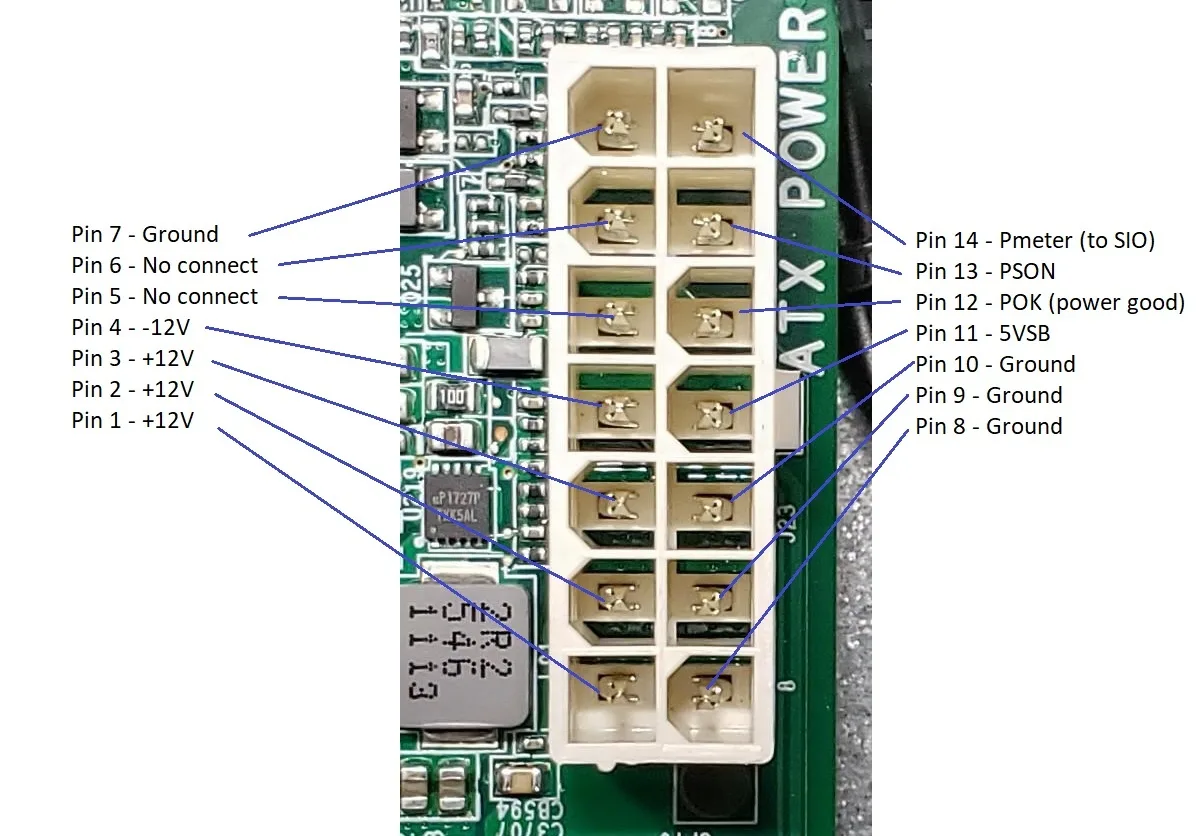
- Identify the green PS_ON wire (pin 16) and an adjacent black ground wire.
- Insert one end of the paperclip into the green wire slot (pin 16) and the other into the black wire slot (ground).
- Plug the PSU into a grounded wall outlet.
- Flip the PSU's rear rocker switch to ON.
- The fan should spin within 1-2 seconds. The PSU is now live.
A couple of practical tips:
- If the fan twitches and the PSU clicks off, you've likely got no load. Add a fan or drive on a Molex or SATA connector and try again.
- If you want actual voltage numbers, set a multimeter to DC volts. Black probe on a ground pin, red probe on yellow (+12V) or red (+5V). Tolerances should hold within ATX spec (±5%).
- If you're testing a PSU that's been sitting in storage for years, let it run for a few minutes. Old electrolytic caps wake up slowly, and any clicking or coil whine usually fades after 60 seconds.
PSU Tester vs Paperclip: Which Method Should You Use?
Both work. They serve slightly different jobs.
A PSU tester is a small plug-in board with an LCD. You push it onto the 24-pin connector and read all the rails at once. No paperclip, no guessing.
Most testers also show PG (Power Good) signal status, which a paperclip can't tell you.
| Method | Cost | What It Shows | Best For |
|---|---|---|---|
| Paperclip | Free | Fan spin only | Quick "is it dead?" check |
| PSU tester | $10-$40 | All rails + PG signal | Buying used, diagnosing, repeat work |
Our research shows PSU testers are worth it once you start doing this regularly. The Intel ATX12V specification defines what each rail should read, and a tester enforces that standard visually.
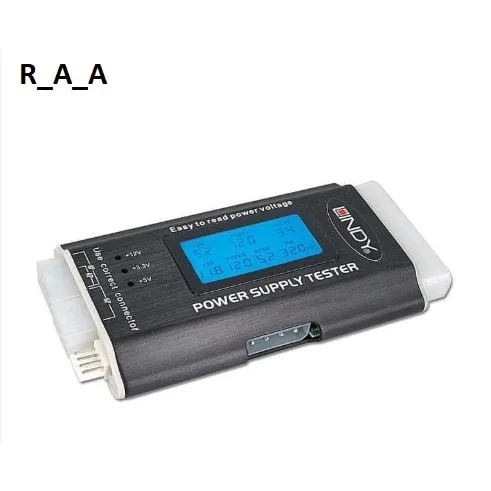
If you only need to confirm a PSU spins up before installing it in a build, the paperclip method is fine. If you're troubleshooting a PC that won't POST and you suspect the PSU, the tester saves a step.
Jump Starting a Modular or Semi-Modular PSU: What Changes
Modular PSUs don't really change the trick. The 24-pin connector still has the same green PS_ON pin and the same ground pins, and that's where the paperclip goes.
What does change is how you handle the cabling:
- On a fully modular PSU, the 24-pin cable must be plugged in. Modular PSUs only energize the rails once the controller detects a connected cable.
- On a semi-modular unit, the 24-pin is hardwired, so you skip that step entirely.
- Leave peripheral cables (SATA, Molex, PCIe) disconnected unless you need a load. Fewer cables, less to trip over.
A modular PSU also tends to behave better with no load, because the controller firmware is newer. Older budget units click off immediately. If yours does, plug in a single case fan on any peripheral connector and try again.
How to Power Up a Server PSU Outside a Server
Server PSUs look intimidating, but the principle is the same. Most follow the same PS_ON logic, just on different connectors.
Here's the decision branch:
- If it's a standard ATX-style server PSU (Dell, HP ProLiant, etc.), it has a green wire. Bridge it to ground on the 24-pin or proprietary output connector.
- If it's a CRPS or proprietary server unit, it may not have a 24-pin at all. Look for the PS_ON or PWD pin in the PSU's datasheet, usually a small 2-pin or 3-pin connector on the PSU face.
- If you're using an HP Common Slot or Dell PowerEdge PSU, search the specific model's pinout. Each vendor uses its own enable logic.
Voltage is the other gotcha. Server PSUs are typically 12V only on the output side. That's perfect for a GPU test rig or a 12V fan bench, but it won't run a regular motherboard expecting +5V and +3.3V.
Aggregate user reports confirm the trick works on most server PSUs from the last decade. The 80 PLUS certification program lists efficiency ratings, which often hint at the unit's generation and capabilities.
Using an Old ATX PSU as a Bench Power Supply
This is where the paperclip trick really pays off. A "dead" PC PSU becomes a useful lab tool. Once you leave the green wire bridged, you essentially have a switchable multi-rail power supply.
What you get:
- +12V, +5V, +3.3V, and 5VSB all available
- Plenty of current (often 30A+ on +12V on older 500-700W units)
- Built-in short-circuit, over-voltage, and over-current protection
Common bench builds:
- A car amp or 12V heater
- A 3D printer's hot end and bed (with a buck converter for the 12V side)
- LED strips for lighting projects
- A GPU test rig before dropping it into a real PC
To make it safer, wire a proper switch and binding posts instead of relying on the paperclip long-term. A 10Ω 10W resistor on +12V keeps the PSU from no-load clicking. Per manufacturer documentation, all major brands (Corsair, Seasonic, EVGA, be quiet!) support this kind of use as long as you stay within rated wattage.
Reading the Voltage Rails Once It's Running
Paperclip confirmed the fan spins. Good. Now confirm the rails are actually within spec.
| Rail | Color (ATX standard) | Expected Voltage | Tolerance |
|---|---|---|---|
| +12V | Yellow | 12.00V | ±5% (11.40-12.60V) |
| +5V | Red | 5.00V | ±5% (4.75-5.25V) |
| +3.3V | Orange | 3.30V | ±5% (3.14-3.47V) |
| 5VSB | Purple | 5.00V | ±5% |
| -12V | Blue | -12.00V | ±10% |
Set your multimeter to DC volts. Black probe on any black wire (ground). Red probe on the rail you want to test.
A PSU that reads within tolerance is healthy enough to use. A PSU reading 11.0V on +12V or 4.5V on +5V is dying and should be replaced.
A few practical points:
- Multimeters are cheap insurance. Even a $10 unit is fine for this.
- A reading right at the edge of tolerance usually means the PSU is on its way out, especially under load.
- If you see voltage bouncing wildly, the PSU's controller is unstable. Replace it.
Jump Starting a Laptop Power Adapter or Brick
Laptop adapters are different beasts. There's no PS_ON pin and no paperclip trick. They're sealed DC bricks that deliver a fixed voltage (commonly 19.5V or 20V) and that's it.
So "jump starting" a laptop brick doesn't mean turning it on. It means diagnosing whether it's alive.
How to test a laptop adapter:
- Plug it into the wall. Look for the indicator LED on the brick, most have one.
- Use a multimeter on the tip. Set to 20V range, black on the outer barrel, red on the inner pin.
- A healthy reading is within ±5% of the rated voltage (e.g., 19.5V adapter reads 18.5-20.5V).
- A reading of 0V or significantly low means a failed adapter.
If the adapter reads correctly but the laptop still won't charge, the problem is almost certainly the laptop's charging circuit, not the brick. There's no manual start procedure for laptop power supplies. They're on when plugged in, off when unplugged.
For larger bench-style DC supplies used in labs, the same idea applies. They turn on the moment AC hits them. Most have a front-panel switch and a current/voltage readout.
Our research shows the "PSU won't turn on" question almost always means a desktop ATX unit, not a laptop brick.
Common Mistakes That Fry PSUs (or Worse)
The paperclip trick is safe when done right. Done wrong, it can destroy the PSU, the components you're testing, or both.
Top mistakes we see in aggregate user reports:
- Bridging the wrong pins. Adjacent pins to PS_ON include +5V and 5VSB. Shorting those to ground trips protection instantly.
- Skipping the discharge wait. Capacitors hold charge briefly after unplug. Give it 30+ seconds.
- No load on the +12V rail. Most PSUs refuse to run, or click off in seconds. Always plug in a fan or drive.
- Using a paperclip that's too thick or bent too tight. Friction damage on the plastic connector housing is permanent.
- Re-inserting the paperclip while the PSU is live. That's how you get arcing and bent pins.
- Trying this on a laptop brick. There's no PS_ON pin, and prying into the brick can expose mains voltage.
A good rule: treat the paperclip as a test tool, not a permanent fix. Once you've confirmed the PSU works, remove it and install the PSU properly in a system.
Safety Rules You Shouldn't Skip
Paperclip jump-starting is low-voltage DC on the output side. The risk isn't from 12V, it's from the AC mains inside the PSU.
Never, ever open the PSU casing. The primary side holds 300V+ DC on the bulk capacitors even after the unit is unplugged. This is the rule that protects your life.
Other must-follow safety habits:
- Always unplug the PSU before swapping the paperclip.
- Keep the PSU on a non-conductive surface (wood table, dry cardboard). No carpet.
- Keep liquids, drinks, and pets at a distance.
- Wear safety glasses if the PSU is old. Failing electrolytic caps can vent.
- Verify UL, CE, or TÜV certification on the PSU label. Unbranded units often lack proper safety isolation.
The relevant safety standard for PC power supplies is IEC 62368-1, the modern successor to IEC 60950, for audio/video/ICT equipment. Manufacturer documentation always lists the certifications the unit carries.
What to Do If the PSU Still Won't Start
You've bridged the green wire, flipped the switch, and nothing happens. Time to troubleshoot.
No fan spin, no click, no lights
The PSU isn't receiving mains power. Check:
- Wall outlet is live (plug in a lamp to verify).
- PSU rocker switch is on (yes, people miss this).
- IEC power cable is fully seated on both ends.
If those check out, the PSU is likely dead at the primary side. Replace it.
Fan twitches, then clicks off
OCP or OPP is tripping. The PSU needs a load. Plug in any case fan or 3.5-inch hard drive on a SATA or Molex connector and retry.
Fan spins but rails read 0V on a multimeter
The PSU is in standby, not running. Your paperclip isn't making contact. Re-seat it firmly, or swap to a stiffer 18 AWG wire.
Fan spins, rails look right, but PC still won't POST
The PSU is fine. The problem is downstream (motherboard, CPU, RAM, or GPU). Move on to those components.
Jump Starting a PSU: Your Decision Guide
If you're still on the fence about which method fits you, this should settle it.
| If You Want To… | Use This Method |
|---|---|
| Confirm a PSU spins before installing it | Paperclip + load fan |
| Read all voltages at once | PSU tester |
| Diagnose a "dead" PC PSU | PSU tester + multimeter |
| Build a 12V bench supply from a junk PC | Paperclip, leave bridged |
| Power a server PSU outside a server | Manufacturer-specific pinout + paperclip |
| Test a laptop brick | Multimeter only, no paperclip |
A clean paperclip test plus a $15 PSU tester covers 90% of cases. Anything beyond that usually means swapping in a known-good unit to isolate the failure.
FAQs About Jump Starting a Power Supply
Is jump-starting a PSU safe?
Yes, as long as you stay on the low-voltage DC side. Bridging the green PS_ON pin to ground is exactly what the motherboard does. Don't open the PSU casing.
The internal capacitors can deliver a lethal shock even after unplug.
Can a paperclip damage the PSU?
It can if it slips and shorts adjacent pins. Use an unbent paperclip, hold it straight, and seat it firmly. A 22 AWG solid wire is safer for repeat work.
Why does my PSU click off with no load?
Modern PSUs include over-current protection (OCP). Without any device drawing current, the protection circuits often flag the condition as a fault. A single case fan or hard drive on a peripheral connector solves it.
How long can a PSU run with the green wire bridged?
Indefinitely, within reason. Many hobbyists leave them running for hours as bench units. After 30-60 minutes, check that the fan is still spinning and the case isn't getting hot.
Old electrolytic capacitors are the failure point if a PSU dies during a long burn-in.
What's the difference between ATX and EPS jump-starting?
Both use the same green PS_ON pin logic. The difference is the connector: ATX is the 24-pin motherboard cable, EPS is the 8-pin CPU cable. Bridging PS_ON on either should turn on the PSU, though EPS-only on some units won't bring up the full rail set.
Can I jump start a PSU with a screwdriver?
Technically yes, but it's risky. Screwdrivers are metal, conductive, and easy to slip. A paperclip or dedicated jumper wire gives you more control.